Animatable 自訂動畫
步驟
- 設定作用域 rememberCoroutineScope()
- 設定初始值 initialValue
- 設定動畫開始後,要完成的目標值 targetValue
rememberCoroutineScope()
Prerequisites:
為什麼要設定作用域?因為動畫是很耗時,需要協程launch()來幫忙,要呼叫協程之前,需要使用Compose的作用域rememberCoroutineScope(),才能呼叫協程launch()。
1
2
3
4
  val scope = rememberCoroutineScope()
  scope.launch {
      // 動畫展示
  }
設定初始值 initialValue
Prerequisites:
語法
val 變數名 = remeber { Animatable(initialValue = 初始值) }
val scale = remember { Animatable(initialValue = 1f) }
會在記憶體建立一個空間儲存Animatable的物件,Animatable物件儲存初始值value,value一開始是儲存初始值(initialValue),當value改變成目標值(targetValue),Compose就會重繪畫面。
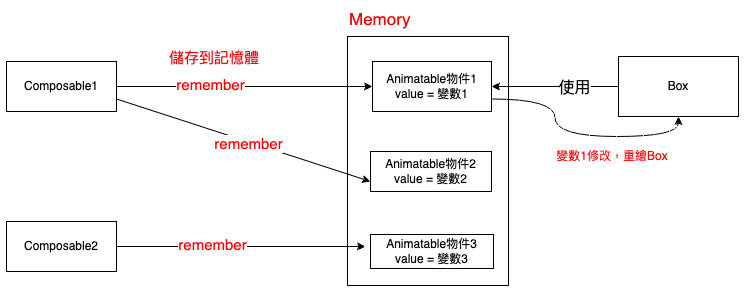
animateTo
Prerequisites:
語法
Animatable變數名.animateTo(
    targetValue = 目標值,
    animationSpec = 動畫
)
scale.animateTo(
    targetValue = 2f,
    animationSpec = tween(1000)
)


1
2
3
4
5
6
7
8
9
10
11
12
13
14
15
16
17
18
19
20
21
22
23
24
25
26
27
@Composable
fun AnimatableExample() {
  // 1f代表原本大小
  val scale = remember { Animatable(initialValue = 1f) }
  val scope = rememberCoroutineScope()
  Box(modifier = Modifier
    .fillMaxSize()
    .background(Color.Yellow)
    .clickable {  // 點擊
      scope.launch {
        // 動畫到目標值
        scale.animateTo(
          targetValue = 2f,  // 目標值:放大2倍
          animationSpec = tween(1000)  // 動畫持續時間1秒
        )
        delay(500)
        scale.animateTo(targetValue = 1f)  // 還原成原本大小
      }
    }
  ) {
    Box(modifier = Modifier
      .size(100.dp)
      .scale(scale.value)
      .background(Color.Blue)
    )
  }
}
使用LaunchedEffect
Prerequisites:
1
2
3
4
5
6
7
8
9
10
11
12
13
14
15
16
17
18
19
20
21
22
23
24
25
26
27
28
29
@Composable
fun AnimatableExample2() {
  // 初始值
  val scale = remember { Animatable(initialValue = 1f) }
  var isExpanded by remember { mutableStateOf(false) }
  // 當isExpanded發生改變,就會呼叫花括號{}區塊
  LaunchedEffect(isExpanded) {
    scale.animateTo(
      // 判斷isExpanded是否為true,若為true就放大,false就恢復原狀
      targetValue = if (isExpanded) 2f else 1f,
      animationSpec = tween(5000)
    )
  }
  val scope = rememberCoroutineScope()
  Box(modifier = Modifier
    .fillMaxSize()
    .background(Color.Yellow)
    .clickable {
      // 改變isExpanded
      isExpanded = !isExpanded
    }
  ) {
    Box(modifier = Modifier
      .size(100.dp)
      .scale(scale.value)
      .background(Color.Blue)
    )
  }
}
與 animateXXAsState 的區別
| 特性 | Animatable | animateXXAsState |
|---|---|---|
| 控制方式 | 手動控制 | 自動(狀態驅動) |
| 複雜動畫 | 適合 | 不適合 |
| 連續動畫 | 可以串聯 | 不可以 |
| 使用難度 | 較高 | 簡單 |
1
2
3
4
5
6
7
8
9
10
// animateXXAsState(簡單,自動)
val scale by animateFloatAsState(
    targetValue = if (isExpanded) 1.5f else 1f
)

// Animatable(複雜,手動控制)
val scale = remember { Animatable(1f) }
LaunchedEffect(isExpanded) {
    scale.animateTo(if (isExpanded) 1.5f else 1f)
}
snapTo animateDecay
- snapTo 立即跳躍到目標值(無動畫)
- animateDecay 物理衰減動畫(如滑動後減速)
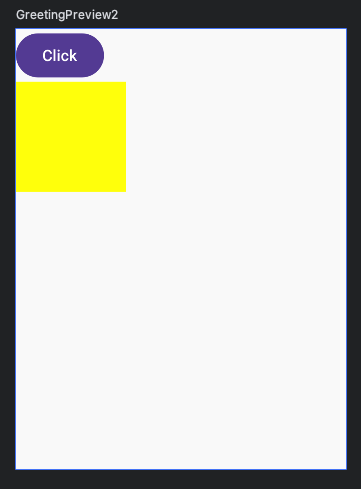
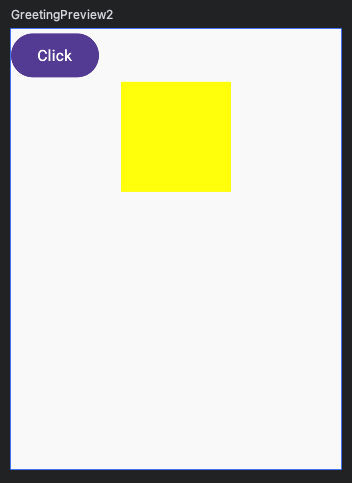
Animatable offset
1
2
3
4
5
6
7
8
9
10
11
12
13
14
15
16
17
18
19
20
21
22
23
24
25
@Composable
fun AnimatableOffset() {
  var offsetX = remember { Animatable(0f) }
  var isActive by remember { mutableStateOf(false) }
  LaunchedEffect(isActive) {
    offsetX.animateTo(
      targetValue = if (isActive) 100f else 0f,
      animationSpec = spring()
    )
  }
  Column {
    Button(onClick = {
      isActive = !isActive
    }) {
      Text("Click")
    }
    Box(
      modifier = Modifier
        .size(100.dp)
        .offset(x = offsetX.value.dp)
        // background() 一定要放在offset之後
        .background(Color.Yellow)
    )
  }
}