detectTransformGestures
語法
1
2
3
4
5
6
7
8
9
suspend fun AwaitPointerEventScope.detectTransformGestures(
    panZoomLock: Boolean = false,
    onGesture: (
        centroid: Offset,
        pan: Offset,
        zoom: Float,
        rotation: Float
    ) -> Unit
)
參數:
- zoom 二指放大縮小
- centroid 取得二指中心點
- rotation 取得旋轉角度
- pan 水平移動、垂直移動
panZoomLock
可以同時放大縮小與拖移。
detectTransformGestures(panZoomLock = false)
不能同時放大縮小與拖移。
detectTransformGestures(panZoomLock = true)
放大縮小
模擬器 + ctrl + 滑鼠左鍵,才有放大縮小效果。
1
2
3
4
5
6
7
8
9
10
11
12
13
14
15
16
17
18
19
20
21
22
23
24
25
26
27
28
29
@Composable
fun detectTransform() {
  var scale by remember { mutableStateOf(1f) }
  Box(
    modifier = Modifier
      .fillMaxSize()
      .pointerInput(Unit) {
        detectTransformGestures(panZoomLock = false) {
            gestureCentroid, gesturePan, gestureZoom, gestureRotation ->
            // 原本的尺寸 * 放大縮小的尺寸
            // coerceIn(縮放最小值, 縮放最大值)
            // 縮小不能小於0.5f 放大不能超過3倍
          scale = (scale * gestureZoom).coerceIn(0.5f, 3f)
        }
      }
  ) {
    Column {
      Box(modifier = Modifier
        .size(200.dp)
        // 設定放大縮小
        .graphicsLayer {
          scaleX = scale
          scaleY = scale
        }
        .background(Color.Blue)
      )
    }
  }
}
取得二指中間點
模擬器 + ctrl + 滑鼠左鍵,才有二指的效果。
1
2
3
4
5
6
7
8
9
10
11
12
13
14
15
16
@Composable
fun detectTransformExample4() {
  var centroid by remember { mutableStateOf(Offset.Zero) }
  Box(
    modifier = Modifier
      .fillMaxSize()
      .pointerInput(Unit) {
        detectTransformGestures(panZoomLock = false) {
            gestureCentroid, gesturePan, gestureZoom, gestureRotation ->
          centroid = gestureCentroid
        }
      }
  ) {
    Text("center x = ${centroid.x.toInt()} , y = ${centroid.y.toInt()}")
  }
}
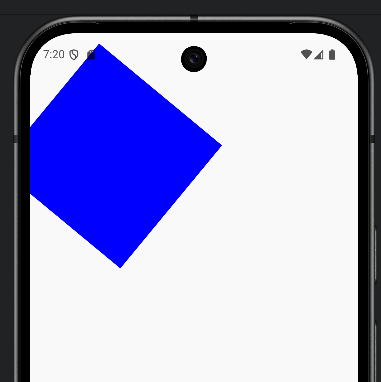
旋轉角度
模擬器 + ctrl + shift + 滑鼠左鍵,滑鼠畫圓形滑動,才有旋轉效果。
1
2
3
4
5
6
7
8
9
10
11
12
13
14
15
16
17
18
19
20
21
22
23
24
25
26
27
@Composable
fun detectTransformExample2() {
  var rotation by remember { mutableStateOf(0f) }
  Box(
    modifier = Modifier
      .fillMaxSize()
      .pointerInput(Unit) {
        detectTransformGestures(panZoomLock = false) {
            gestureCentroid, gesturePan, gestureZoom, gestureRotation ->
          // rotation > 0: 逆時針旋轉
    	  // rotation < 0: 順時針旋轉
          println("旋轉角度: ${rotation}°")
          rotation += gestureRotation
        }
      }
  ) {
    Column {
      Box(modifier = Modifier
        .size(200.dp)
        .graphicsLayer {
          rotationZ = rotation
        }
        .background(Color.Blue)
      )
    }
  }
}
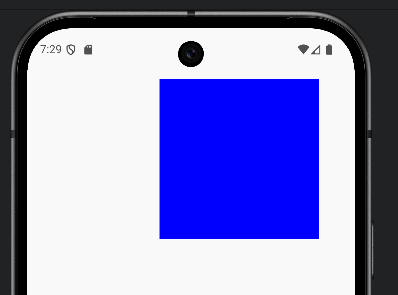
水平 垂直移動 Pan
1
2
3
4
5
6
7
8
9
10
11
12
13
14
15
16
17
18
19
20
21
22
23
24
25
@Composable
fun detectTransformExample3() {
  var offset by remember { mutableStateOf(Offset.Zero) }
  Box(
    modifier = Modifier
      .fillMaxSize()
      .pointerInput(Unit) {
        detectTransformGestures(panZoomLock = false) {
            gestureCentroid, gesturePan, gestureZoom, gestureRotation ->
          offset += gesturePan
        }
      }
  ) {
    Column {
      Box(modifier = Modifier
        .size(200.dp)
        .graphicsLayer {
          translationX = offset.x
          translationY = offset.y
        }
        .background(Color.Blue)
      )
    }
  }
}