Column Row scroll
Prerequisites:
Column 與 Row 滾動語法
val scrollState = rememberScrollState()
// Column 垂直滑動
Modifier.verticalScroll(scrollState)
// Row 水平滑動
Modifier.horizontalScroll(scrollState)
Column 與 Row 都是預先把子元素載入,適合用在表單填寫或靜態的內容。
LazyColumn 與 LazyRow,滑動到(在螢幕上)才載入子元素,之前滑過的(沒有在螢幕上)會被記憶體回收。
Column
一開始就已經先畫好1000個元素在畫布上。
1
2
3
4
5
6
7
8
9
10
11
12
@Composable
fun ScrollExample1() {
  val scrollState = rememberScrollState()
  Column (modifier = Modifier
    .fillMaxSize()
    .verticalScroll(scrollState)
  ) {
    repeat(1000) {
      Text("Item $it")
    }
  }
}
Row
一開始就已經先畫好1000個元素在畫布上。
1
2
3
4
5
6
7
8
9
10
11
12
@Composable
fun ScrollExample2() {
  val scrollState = rememberScrollState()
  Row (modifier = Modifier
    .fillMaxSize()
    .horizontalScroll(scrollState)
  ) {
    repeat(1000) {
      Text("Item $it")
    }
  }
}
scrollTo 滑動到頂部 底部 中間
Column與Row不支援特定位置,以下是錯誤寫法,scrollTo(參數是pixel像素)。
1
scrollState.scrollTo(900)  // 這是像素值,不是項目索引!
scrollTo是suspend function,需要在協程中執行,所以使用Compose專用的協程作用域rememberCoroutineScope()。
1
2
  val scope = rememberCoroutineScope()
  scope.launch { scrollState.scrollTo(scrollState.maxValue/2) }
位置有以下三種:
- Top: 0
- Bottom: scrollState.maxValue
- Middle: scrollState.maxValue / 2
語法:
// 頂部Top
scrollState.scrollTo(0)
// 底部Bottom
scrollState.scrollTo(scrollState.maxValue)
// 中間Middle
scrollState.scrollTo(scrollState.maxValue/2)
scrollto可替換成animateScrollTo。
1
scrollState.animateScrollTo(scrollState.maxValue)
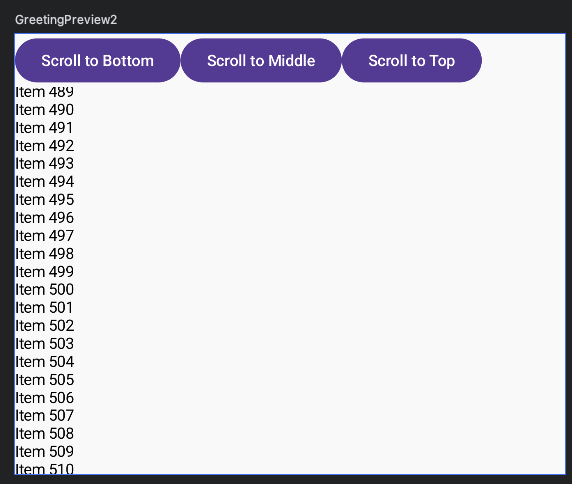
完整程式碼
1
2
3
4
5
6
7
8
9
10
11
12
13
14
15
16
17
18
19
20
21
22
23
24
25
26
27
28
29
30
31
32
33
@Composable
fun ScrollExample3() {
  val scrollState = rememberScrollState()
  val scope = rememberCoroutineScope()
  Column (modifier = Modifier
    .fillMaxSize()){
    Row (modifier = Modifier
      .fillMaxWidth()){
      Button(onClick = {
        scope.launch { scrollState.scrollTo(scrollState.maxValue) }
      }) {
        Text("Scroll to Bottom")
      }
      Button(onClick = {
        scope.launch { scrollState.scrollTo(scrollState.maxValue/2) }
      }) {
        Text("Scroll to Middle")
      }
      Button(onClick = {
        scope.launch { scrollState.scrollTo(0) }
      }) {
        Text("Scroll to Top")
      }
    }
    Column (modifier = Modifier
      .verticalScroll(scrollState)
    ) {
      repeat(1000) {
        Text("Item $it")
      }
    }
  }
}