Scaffold
參考資料:
import
import androidx.compose.material3.*
語法
在@Composable上面要加上以下語法
@OptIn(ExperimentalMaterial3Api::class)
1
2
3
4
5
6
7
8
9
10
Scaffold(
    // 標題欄
    topBar = {},
    // 底部欄
    bottomBar = {},
    // 懸浮按鈕
    floatingActionButton = {},
    // 內容
    content = {}
)
因為content為最後一個參數,所以最後一個參數可以變成Lambda。
1
2
3
4
5
6
7
8
9
10
Scaffold(
    // 標題欄
    topBar = {},
    // 底部欄
    bottomBar = {},
    // 懸浮按鈕
    floatingActionButton = {}
) { innerPadding ->
	// 內容
}
content 一定要使用innerPadding參數
如果不使用innerPadding會顯示不出來內容
1
2
3
4
5
6
7
8
9
10
11
12
13
14
15
16
17
18
19
20
21
22
23
24
25
26
// content 方法一
@OptIn(ExperimentalMaterial3Api::class)
@Composable
fun ScaffoldExample1() {
  Scaffold(
    topBar = {
      TopAppBar(title = { Text("My App") })
    },
    content = { innerPadding ->
      Text("Content", modifier = Modifier.padding(innerPadding))
    }
  )
}

// content 方法二
@OptIn(ExperimentalMaterial3Api::class)
@Composable
fun ScaffoldExample2() {
  Scaffold(
    topBar = {
      TopAppBar(title = { Text("My App") })
    }
  ) {innerPadding ->
    Text("Content", modifier = Modifier.padding(innerPadding))
  }
}
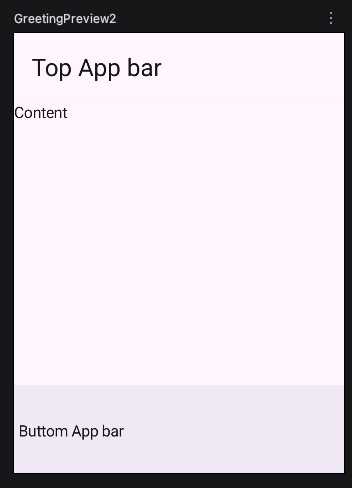
Bottom App bar
1
2
3
4
5
6
7
8
9
10
11
12
13
14
15
16
@OptIn(ExperimentalMaterial3Api::class)
@Composable
fun ScaffoldExample2() {
  Scaffold(
    topBar = {
      TopAppBar(title = { Text("Top App bar") })
    },
    bottomBar = {
      BottomAppBar {
        Text("Buttom App bar")
      }
    }
  ) { innerPadding ->
    Text("Content", modifier = Modifier.padding(innerPadding))
  }
}