LazyColumn
Prerequisites:
LazyColumn特性:
- 只渲染可見項目:只會渲染當前螢幕可見的項目,離開螢幕的項目會被回收
- 高效能:適合大量數據(成千上萬個項目)
- 支援複雜佈局:自動處理滾動狀態、內存管理
- 滾動狀態: 內建 LazyListState
import
import androidx.compose.foundation.lazy.LazyColumn
import androidx.compose.foundation.lazy.items
語法
1
2
3
4
5
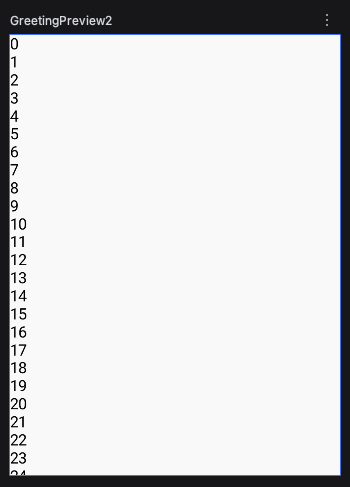
  LazyColumn {
    items(1000) {
      Text("$it")
    }
  }
item 單筆資料
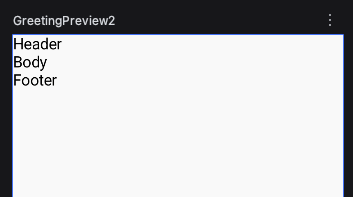
可由多個 item 單筆資料組成。
1
2
3
4
5
6
7
8
9
10
11
12
13
14
@Composable
fun lazyColumnExample2() {
  LazyColumn {
    item {
      Text("Header")
    }
    item {
      Text("Body")
    }
    item {
      Text("Footer")
    }
  }
}
items 指定數量
用在LazyColumn中,跟repeat一樣,輸出資料,但repeat不能使用在LazyColumn。
以下是錯誤的寫法:
1
2
3
4
5
  LazyColumn {
    repeat(1000) {
      Text("$it")
    }
  }
正確寫法1
1
2
3
4
5
  LazyColumn {
    items(1000) {
      Text("$it")
    }
  }
正確寫法2,執行結果跟上面相同。
1
2
3
4
5
  LazyColumn {
    items(1000) { index ->
      Text("$index")
    }
  }
items 與 list
1
2
3
4
5
6
7
8
9
@Composable
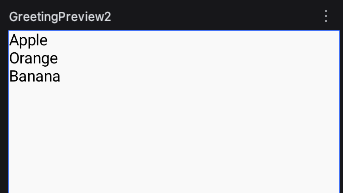
fun lazyColumnExample3() {
  val data = listOf("Apple", "Orange", "Banana")
  LazyColumn {
    items(data) { fruit ->
      Text("$fruit")
    }
  }
}
itemsIndexed 有索引
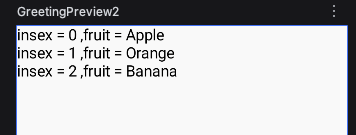
1
2
3
4
5
6
7
8
9
@Composable
fun lazyColumnExample4() {
  val data = listOf("Apple", "Orange", "Banana")
  LazyColumn {
    itemsIndexed(data) { index, fruit ->
      Text("insex = $index ,fruit = $fruit")
    }
  }
}
滾動
Prerequisites:
rememberLazyListState
滾動到某個位置,需要使用rememberLazyListState()來幫忙,並把rememberLazyListState代入到LazyColumn的state參數中。
語法:
val lazyState = rememberLazyListState()
LazyColumn (state = lazyState) {}
scrollToItem 滾動到指定項目
scrollToItem()是suspend function,需要在協程的作用域(Coroutines Scope)才能呼叫,支援Compose的Coroutines Scope是 rememberCoroutineScope。
語法如下:
val scope = rememberCoroutineScope()
scope.launch {
  lazyState.scrollToItem(100)
}
scrollToItem可替換為有動畫的animateScrollToItem
lazyState.animateScrollToItem(100)
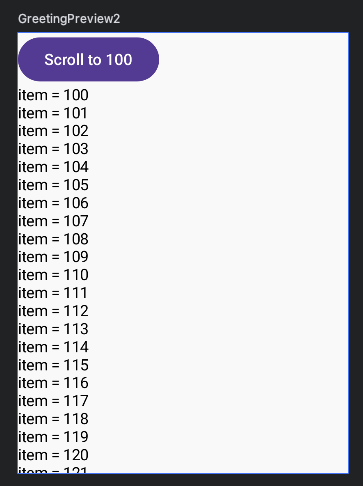
完整程式碼:
1
2
3
4
5
6
7
8
9
10
11
12
13
14
15
16
17
18
19
@Composable
fun lazyColumnExample5() {
  val lazyState = rememberLazyListState()
  val scope = rememberCoroutineScope()
  Column {
    Row {
      Button(onClick = {
        scope.launch {
          lazyState.scrollToItem(100)
        }
      }) { Text("Scroll to 100") }
    }
    LazyColumn (state = lazyState) {
      items(1000) {
        Text("item = $it")
      }
    }
  }
}
滾動到頂部 底部 中間
LazyColumn的Scroll沒有像Column的rememberScrollState有maxValue,要把list移到前面,透過list.size滾動到最底部。
完整程式碼
1
2
3
4
5
6
7
8
9
10
11
12
13
14
15
16
17
18
19
20
21
22
23
24
25
26
27
28
29
30
31
32
@Composable
fun lazyColumnExample5() {
  val lazyState = rememberLazyListState()
  val scope = rememberCoroutineScope()
  val list = List(100) {
    "Item $it"
  }
  Column {
    Row {
      Button(onClick = {
        scope.launch {
          lazyState.animateScrollToItem(0)
        }
      }) { Text("Top") }
      Button(onClick = {
        scope.launch {
          lazyState.animateScrollToItem(list.size / 2)
        }
      }) { Text("Middle") }
      Button(onClick = {
        scope.launch {
          lazyState.animateScrollToItem(list.size)
        }
      }) { Text("Scroll to 100") }
    }
    LazyColumn (state = lazyState){
      items(list) { item ->
        Text("item = $item")
      }
    }
  }
}
以下是舊文章
1
2
LazyColumn(horizontalAlignment = Alignment.CenterHorizontally) {
}
設置前

設置後