list
Prerequisites:
list是有順序。
語法
使用[ ] 方括號代表list。
空 list
list() 或 [] 都是宣告空的list。
元素
用逗號分隔list中的元素。
1
2
data = [1, 3, 5, 7]
print(data, type(data))
[1, 3, 5, 7] <class 'list'>
元素可以為不同型別
1
2
list1 = ["abc", 123, ["Hello", 456]]
print(f"list1: {list1}, type= {type(list1)}")
list1: ['abc', 123, ['Hello', 456]], type= <class 'list'>
負數索引
-1為字串最後一位,-2為倒數第2位。
| list | abc | 123 | ['Hello', 456] |
|---|---|---|---|
| 正數索引 | 0 | 1 | 2 |
| 負數索引 | -3 | -2 | -1 |
1
2
3
list1 = ["abc", 123, ["Hello", 456]]
print(list1[-1])
print(list1[-2])
['Hello', 456]
123
新增修改刪除
1
2
3
4
5
6
7
8
9
10
list1 = ["abc", 123, ["Hello", 456]]
# 新增
list1.append("xyz")
print(list1)
# 修改
list1[0] = "Hi"
print(list1)
# 刪除
del list1[0]
print(list1)
['abc', 123, ['Hello', 456], 'xyz']
['Hi', 123, ['Hello', 456], 'xyz']
[123, ['Hello', 456], 'xyz']
list 指派相同記憶體位址
以下程式碼list1與list2 記憶體位址都相同,修改list2的內容,會影嚮list1。
1
2
3
4
5
list1 = ["abc", 123, ["Hello", 456]]
list2 = list1
list2[0] = "World"
print(f"list1: {list1} , id : {id(list1)}")
print(f"list2: {list2} , id : {id(list2)}")
list1: ['World', 123, ['Hello', 456]] , id : 4456878144
list2: ['World', 123, ['Hello', 456]] , id : 4456878144
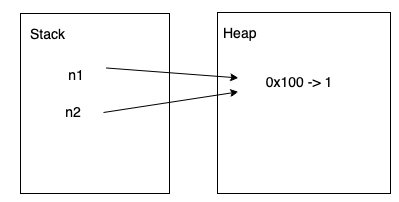
以下程式碼不是list,但變數指派給其它變數,是複製記憶體位址給其它變數。
Python與Java、C++不同的是,C++ 基本型別的變數指派給其它變數,是複製「內容」,也就是記憶體指向的「值」給變數,並不是複製記憶體位址。
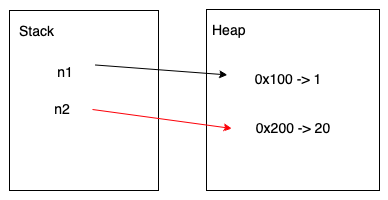
一開始二個變數都指向駐留池 相同記憶體位址,修改n2為20,會先到駐留池看是否有20的物件,若沒有會建立一個20的物件,並把n2指向新的20物件的記憶體位址。
1
2
3
4
5
6
7
8
n1 = 1
n2 = n1
print(f"n1: {n1} , id : {id(n1)}")
print(f"n2: {n2} , id : {id(n2)}")
print("After")
n2 = 20
print(f"n1: {n1} , id : {id(n1)}")
print(f"n2: {n2} , id : {id(n2)}")
n1: 1 , id : 4541352720
n2: 1 , id : 4541352720
After
n1: 1 , id : 4541352720
n2: 20 , id : 4541353328
list記憶體位址
Prerequisites:
先前在id的文章中提到,英文大小寫字母、數字0-9、底線,為了節省記憶體空間,Python都會指向相同記憶體位址。
Python list的記憶體位址分配跟C++、Java不一樣。
由以下程式碼可以看出x變數、nums[0]、nums[1]、nums[2]、nums[3]全指向同一個記憶體位址。
| 0 | 1 | 2 | 3 |
|---|---|---|---|
| 4370549520 | 4370549520 | 4370549520 | 4370549520 |
1
2
3
4
5
6
7
8
nums = [1, 1, 1, 1]
x = 1
print("address of nums = ", id(nums))
print("address of nums[0] = ", id(nums[0]))
print("address of nums[1] = ", id(nums[1]))
print("address of nums[2] = ", id(nums[2]))
print("address of nums[3] = ", id(nums[3]))
print("address of x = ", id(x))
address of nums =  4360423744
address of nums[0] =  4370549520
address of nums[1] =  4370549520
address of nums[2] =  4370549520
address of nums[3] =  4370549520
address of x =  4370549520
用C++的觀點是,建立一個指標陣列,指標就是記憶體位址,陣列中儲存的是記憶體位址。
1
2
3
4
5
6
int* array[4];
int var1 = 1;
array[0] = &var1;
array[1] = &var1;
array[2] = &var1;
array[3] = &var1;
記憶體位址4370549520儲存「1」的數值。
4370549520 → 1
指標陣列儲存的是記憶體位址,陣列中的pointer都是1的address。
 4360423744
[    0    ][    1    ][    2    ][    3    ]
[ pointer ][ pointer ][ pointer ][ pointer ]
[   &1    ][   &1    ][   &1    ][   &1    ]
[ 4370549520 ][ 4370549520 ][ 4370549520 ][ 4370549520 ]
而nums則是指向指標陣列[0]的記憶體位址4360423744,指標陣列[0]儲存的內容是1的記憶體位址4370549520。
list相關函式
以下函式參數為list。
| 函式名 | 功能 |
|---|---|
| len(list) | list 元素數量 |
| max(list) | list中最大值 |
| min(list) | list中最小值 |
| sum(list) | 元素總合 |
| 函式名 | 功能 |
|---|---|
| list.count(obj) | obj在list出現次數。 |
| list.index(obj) | 尋找obj在list的索引。 |
| list.insert(index, obj) | 把obj插入在某個索引位置。 |
| list.extend(list2) | 把list2併在list的尾部。 |
| list.pop(index) | 刪除索引位置為index的元素,index不寫預設是-1,-1是最後一個。 |
| list.remove(obj) | 刪除obj元素。 |
| list.clear() | 刪除所有元素。 |
| list.copy() | 複製元素至新的list |
| list.reverse() | 反轉list元素 |
| list.sort(key=None, reverse= False) | 排序 |
1
2
3
4
5
6
7
8
9
10
11
12
13
14
15
16
17
18
19
20
21
22
23
24
25
26
27
28
29
30
31
32
33
34
35
36
list1 = [100, 10, 100, 60, 5]
print(f"len = {len(list1)}")
print(f"max = {max(list1)}")
print(f"min = {min(list1)}")
print(f"sum = {sum(list1)}")
print(f"list1.count() = {list1.count(100)}")
print(f"list1.index() = {list1.index(100)}")
# 插入
list1.insert(66,0)
print(f"list1.insert(66,0) = {list1}")
# 擴展
list2 = [-1, -2]
list1.extend(list2)
print(f"list1.extend(list2) = {list1}")
# pop 參數沒寫是-1 串列的尾端
list1.pop()
print(f"list1.pop() = {list1}")
# 刪除索引為1
list1.pop(1)
print(f"list1.pop(1) = {list1}")
# 刪除值為100的元素
list1.remove(100)
print(f"list1.remove(100) = {list1}")
# 複製list1所有元素至list3
list3 = list1.copy()
print(f"list1 = {list1}, id = {id(list1)}")
print(f"list3 = {list3}, id = {id(list3)}")
# 排序
list1.sort()
print(f"list1.sort() = {list1}")
# 反轉
list1.reverse()
print(f"list1.reverse() = {list1}")
# 刪除所有元素
list1.clear()
print(f"list1.clear() = {list1}")
len = 5
max = 100
min = 5
sum = 275
list1.count() = 2
list1.index() = 0
list1.insert(66,0) = [100, 10, 100, 60, 5, 0]
list1.extend(list2) = [100, 10, 100, 60, 5, 0, -1, -2]
list1.pop() = [100, 10, 100, 60, 5, 0, -1]
list1.pop(1) = [100, 100, 60, 5, 0, -1]
list1.remove(100) = [100, 60, 5, 0, -1]
list1 = [100, 60, 5, 0, -1], id = 4361488704
list3 = [100, 60, 5, 0, -1], id = 4361795072
list1.sort() = [-1, 0, 5, 60, 100]
list1.reverse() = [100, 60, 5, 0, -1]
list1.clear() = []
List Comprehension List運算式
語法
[運算式 for 變數 in range或list]
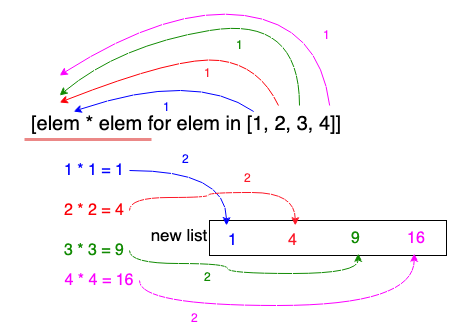
以下程式碼會先從list、字串、range中,取出每一個元素,再進行運算式,再把運算結果放進新的list中。
1
2
3
4
5
6
7
8
list1 = [elem * 2 for elem in range(0, 5)]
print(list1)
list2 = [elem + elem for elem in "Hello"]
print(list2)
list3 = [elem.upper() for elem in "Hello"]
print(list3)
list4 = [elem * elem for elem in [1, 2, 3, 4]]
print(list4)
[0, 2, 4, 6, 8]
['HH', 'ee', 'll', 'll', 'oo']
['H', 'E', 'L', 'L', 'O']
[1, 4, 9, 16]
list.reverse() list翻轉
使用list.reverse()會把原list的元素全部翻轉。
1
2
3
list1 = ["Tom", "Joy", "Jack", "Mary", "Alex", "Alice"]
list1.reverse()
print(f"list1 = {list1} ")
list1 = ['Alice', 'Alex', 'Mary', 'Jack', 'Joy', 'Tom']
reverse=True 翻轉排序
1
2
    session_list.sort(reverse=True)
    return session_list