TextField
TextField要建立StatefulWidget
直接在畫面輸入stateful,就會有選單跳出來。
1
2
3
4
5
6
7
8
9
10
11
12
13
14
15
16
17
18
19
20
21
import 'package:flutter/material.dart';

void main() {
  runApp(MainPage());
}

class MainPage extends StatefulWidget {
  MainPage({Key? key}) : super(key: key);

  @override
  _MainPageState createState() => _MainPageState();
}

class _MainPageState extends State<MainPage> {
  @override
  Widget build(BuildContext context) {
    return Container(
       child: null,
    );
  }
}
簡單TextField程式碼
1
2
3
4
5
6
7
8
9
10
11
12
13
14
15
16
17
18
19
20
21
22
23
24
25
26
27
28
29
30
31
32
33
import 'package:flutter/material.dart';

void main() {
  runApp(MainPage());
}

class MainPage extends StatefulWidget {
  MainPage({Key? key}) : super(key: key);

  @override
  _MainPageState createState() => _MainPageState();
}

class _MainPageState extends State<MainPage> {
  @override
  Widget build(BuildContext context) {
    return MaterialApp(
        home: Scaffold(
            body: Container(
      width: double.infinity,
      height: double.infinity,
      color: Colors.yellow,
      child: Column(
        children: [
          TextField(),
          TextField(),
          TextField(),
          TextButton(onPressed: () {}, child: Text("送出"))
        ],
      ),
    )));
  }
}
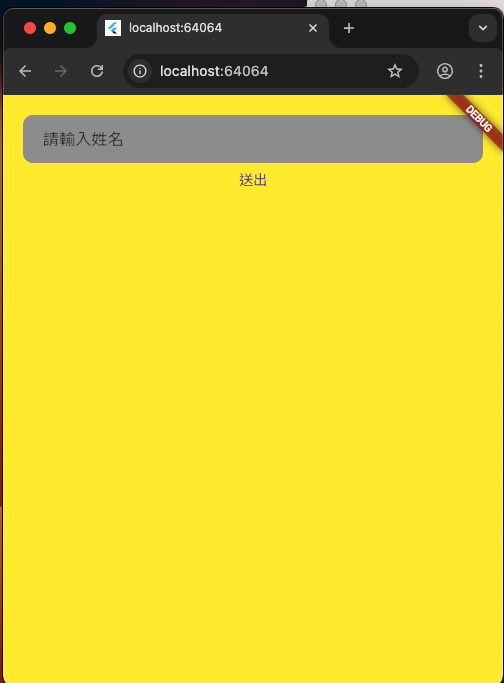
InputDecoration 輸入框樣式
語法
TextField(decoration: InputDecoration())
InputDecoration 屬性說明
| 屬性 | 類別 | 說明 |
|---|---|---|
| contentPadding | EdgeInsets | 內部間距 |
| hintText | String | 提示文字 |
| fillColor | Colors | 顏色 |
| border | OutlineInputBorder | 輸入框邊框 |
OutlineInputBorder 屬性說明
| 屬性 | 類別 | 說明 |
|---|---|---|
| borderSide | BorderSide | none為無邊框 |
| borderRadius | BorderRadius | 輸入框圓角 |
1
2
3
4
5
6
7
8
9
10
11
12
13
14
15
16
17
18
19
20
21
22
23
24
25
26
27
28
29
30
31
32
33
34
35
36
37
38
39
40
import 'package:flutter/material.dart';

void main() {
  runApp(MainPage());
}

class MainPage extends StatefulWidget {
  MainPage({Key? key}) : super(key: key);

  @override
  _MainPageState createState() => _MainPageState();
}

class _MainPageState extends State<MainPage> {
  @override
  Widget build(BuildContext context) {
    return MaterialApp(
        home: Scaffold(
            body: Container(
      padding: EdgeInsets.all(20.0),
      width: double.infinity,
      height: double.infinity,
      color: Colors.yellow,
      child: Column(
        children: [
          TextField(
              decoration: InputDecoration(
                  contentPadding: EdgeInsets.only(left: 20.0, right: 10),
                  hintText: "請輸入姓名",
                  fillColor: Colors.grey,
                  filled: true,
                  border: OutlineInputBorder(
                      borderSide: BorderSide.none,
                      borderRadius: BorderRadius.circular(10.0)))),
          TextButton(onPressed: () {}, child: Text("送出"))
        ],
      ),
    )));
  }
}
controller
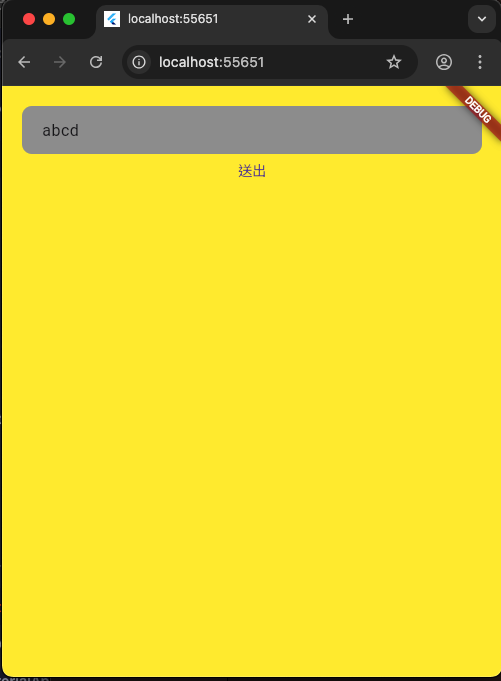
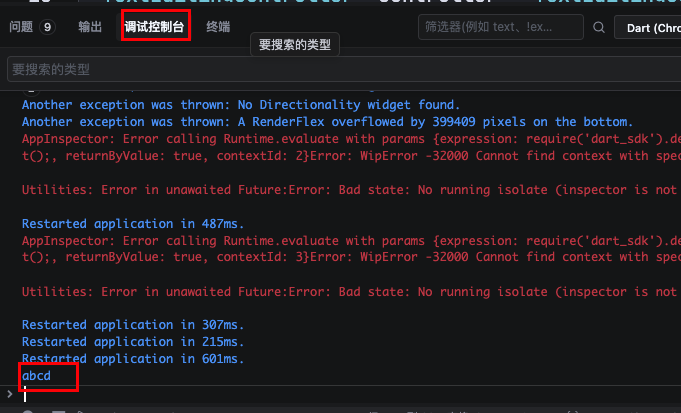
TextField有一個屬性為 controller,類別是TextEditingController。
語法:
TextEditingController _controller = TextEditingController();
搭配TextButtom可以收到使用者輸入的內容_controller.text。
1
2
3
TextButton(onPressed: () {
             print(_controller.text);
           }, child: Text("送出"))
1
2
3
4
5
6
7
8
9
10
11
12
13
14
15
16
17
18
19
20
21
22
23
24
25
26
27
28
29
30
31
32
33
34
35
36
37
38
39
40
41
42
43
44
45
46
import 'package:flutter/material.dart';

void main() {
  runApp(MainPage());
}

class MainPage extends StatefulWidget {
  MainPage({Key? key}) : super(key: key);

  @override
  _MainPageState createState() => _MainPageState();
}

class _MainPageState extends State<MainPage> {
  TextEditingController _controller = TextEditingController();
  @override
  Widget build(BuildContext context) {
    return MaterialApp(
        home: Scaffold(
            body: Container(
      padding: EdgeInsets.all(20.0),
      width: double.infinity,
      height: double.infinity,
      color: Colors.yellow,
      child: Column(
        children: [
          TextField(
              controller: _controller,
              decoration: InputDecoration(
                  contentPadding: EdgeInsets.only(left: 20.0, right: 10),
                  hintText: "請輸入姓名",
                  fillColor: Colors.grey,
                  filled: true,
                  border: OutlineInputBorder(
                      borderSide: BorderSide.none,
                      borderRadius: BorderRadius.circular(10.0)))),
          TextButton(
              onPressed: () {
                print(_controller.text);
              },
              child: Text("送出"))
        ],
      ),
    )));
  }
}
onChanged onSubmitted
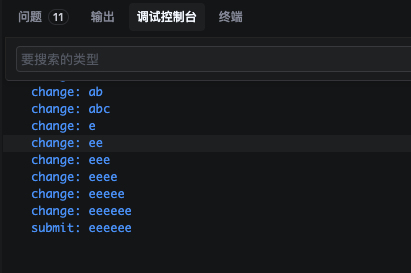
TextField有onChanged 與 onSubmitted 屬性。
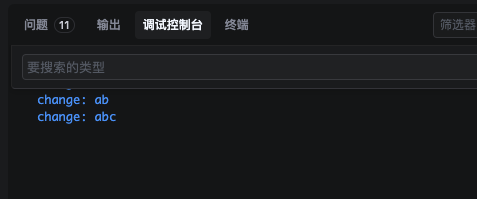
onChanged
onChanged()是輸入TextField有變化就會收到。
onChanged: (value) {
  print("change: $value");
}
onSubmitted
onSubmitted,在Web瀏覽器,當使用者在TextField按下鍵盤enter,就會收到。
onSubmitted: (value) {
  print("submit: $value");
}
1
2
3
4
5
6
7
8
9
10
11
12
13
14
15
16
17
18
19
20
21
22
23
24
25
26
27
28
29
30
31
32
33
34
35
36
37
38
39
40
41
42
43
44
45
46
47
48
49
50
51
52
import 'package:flutter/material.dart';

void main() {
  runApp(MainPage());
}

class MainPage extends StatefulWidget {
  MainPage({Key? key}) : super(key: key);

  @override
  _MainPageState createState() => _MainPageState();
}

class _MainPageState extends State<MainPage> {
  TextEditingController _controller = TextEditingController();
  @override
  Widget build(BuildContext context) {
    return MaterialApp(
        home: Scaffold(
            body: Container(
      padding: EdgeInsets.all(20.0),
      width: double.infinity,
      height: double.infinity,
      color: Colors.yellow,
      child: Column(
        children: [
          TextField(
              controller: _controller,
              onChanged: (value) {
                print("change: $value");
              },
              onSubmitted: (value) {
                print("submit: $value");
              },
              decoration: InputDecoration(
                  contentPadding: EdgeInsets.only(left: 20.0, right: 10),
                  hintText: "請輸入姓名",
                  fillColor: Colors.grey,
                  filled: true,
                  border: OutlineInputBorder(
                      borderSide: BorderSide.none,
                      borderRadius: BorderRadius.circular(10.0)))),
          TextButton(
              onPressed: () {
                print(_controller.text);
              },
              child: Text("送出"))
        ],
      ),
    )));
  }
}