streamlit
安裝
打開Pycharm的終端機,輸入以下指令。
pip install streamlit
啟動Server
建立 檔名.py,內容如下:
1
2
3
4
5
import streamlit as st
# 標題文字
st.title("Streamlit demo")
# 輸出文字在網頁上
st.write("你好!歡迎光臨")
打開Pycharm的終端機,輸入以下指令。
streamlit run 檔名.py
執行後會自動彈跳出網頁,程式有修改,不用重新啟動,只要重新整理網頁即可,這是即時更新。
Api文件
進入此網站https://streamlit.io/
選擇「Docs」https://docs.streamlit.io/
選擇「Develop」>「API reference」
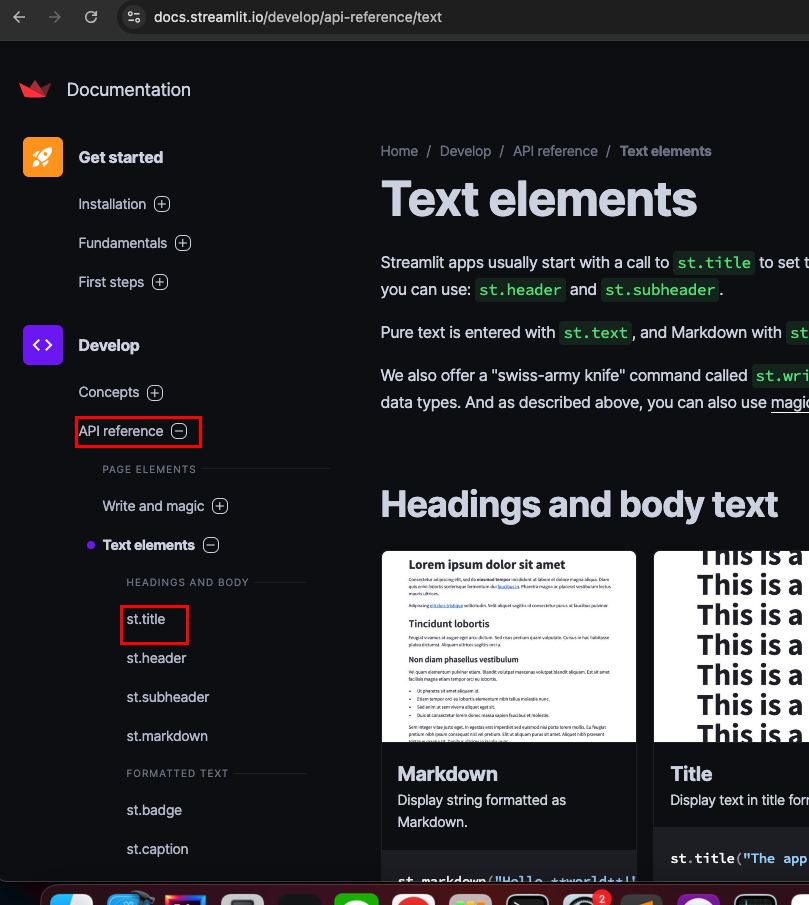
Text elements
write 輸出文字 自動換行
「Develop」>「API reference」> 「Write and magic」
1
2
3
import streamlit as st
# 輸出文字在網頁上
st.write("你好!歡迎光臨")
每一個write()函式執行完,會有一個空白換行,會自動換行。
1
2
3
4
5
6
import streamlit as st
st.write("The anchor name of the header that can be accessed with #anchor in the URL. If omitted, it generates an anchor using the body. If False, the anchor is not shown in the UI.")

st.write("The tooltip can optionally contain GitHub-flavored Markdown, including the Markdown directives described in the body parameter of st.markdown.")

st.write("An integer specifying the width in pixels: The element has a fixed width. If the specified width is greater than the width of the parent container, the width of the element matches the width of the parent container.")
The anchor name of the header that can be accessed with #anchor in the URL. If omitted, it generates an anchor using the body. If False, the anchor is not shown in the UI.

The tooltip can optionally contain GitHub-flavored Markdown, including the Markdown directives described in the body parameter of st.markdown.

An integer specifying the width in pixels: The element has a fixed width. If the specified width is greater than the width of the parent container, the width of the element matches the width of the parent container.
title header subheader 標題
「Develop」>「API reference」>「Text elements」
1
2
3
4
5
6
7
import streamlit as st
# 標題
st.title("標題")
# 一級標題
st.header("一級標題")
# 二級標題
st.subheader("二級標題")
插入圖片
1
st.image("./img/csv.png")
可設定寬度
1
st.image("./img/csv.png", width=100)
音樂影片
1
2
3
4
5
import streamlit as st
# 音樂
st.audio()
# 影片
st.video()
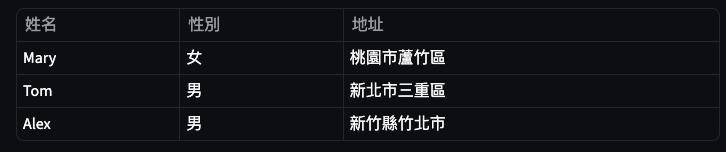
表格
1
2
3
4
5
6
7
import streamlit as st
student_data = {
    "姓名":["Mary","Tom","Alex"],
    "性別":["女","男","男"],
    "地址":["桃園市蘆竹區","新北市三重區","新竹縣竹北市"]
}
st.table(student_data)
輸入框
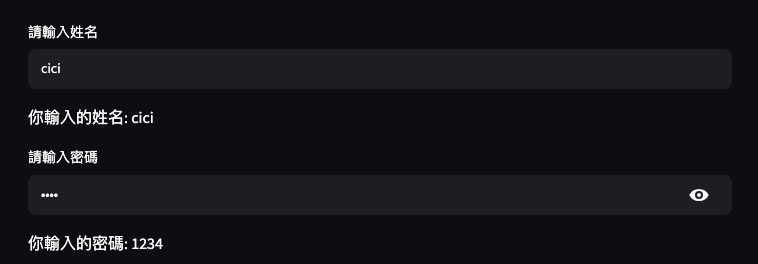
API位置Develop/API reference/Input widgets/st.text_input
1
2
3
4
5
6
7
8
9
10
import streamlit as st

name = st.text_input("請輸入姓名")
if name:
    st.write(f"你輸入的姓名: {name}")

# 密碼 type類型為password
password = st.text_input("請輸入密碼", type="password")
if password:
    st.write(f"你輸入的密碼: {password}")
radio
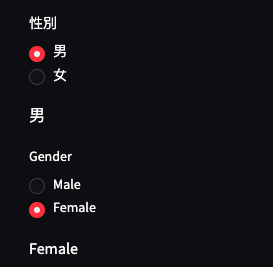
Develop/API reference/Input widgets/st.radio
1
2
3
4
5
6
7
import streamlit as st
sex = st.radio("性別", ("男", "女"))
st.write(sex)

## index為預設選項
gender = st.radio("Gender", ("Male", "Female"), index=1)
st.write(gender)
text_area
1
2
3
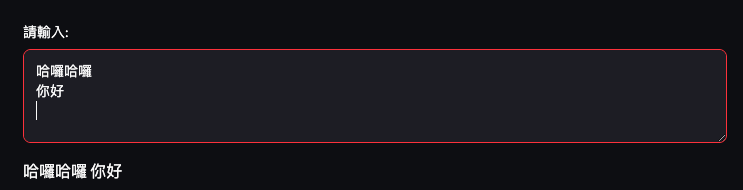
import streamlit as st
text_data = st.text_area("請輸入:")
st.write(text_data)
Configuration
Develop/API reference/Configuration
文字表情複製https://tw.piliapp.com/emoji/list/
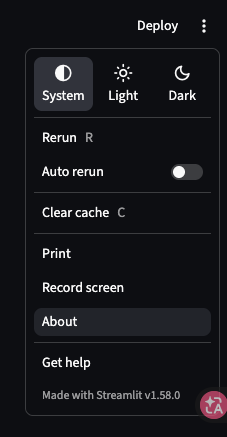
menu_items 為固定選項,只能寫About,內容是文字,Get Help,內容一定要是網址。
1
2
3
4
5
6
7
8
9
10
11
import streamlit as st
st.set_page_config(
    page_title="Streamlit Example",
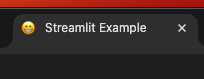
    page_icon="😁",
    layout="wide",
    initial_sidebar_state="expanded",
    menu_items={
        "About": "This is a example page.",
        "Get Help": "https://streamlit.io/",
    }
)
menu_items:
page_icon:
menu_items 也可以不寫內容。
1
2
3
4
5
6
7
8
import streamlit as st
st.set_page_config(
    page_title="Streamlit Example",
    page_icon="😁",
    layout="wide",
    initial_sidebar_state="expanded",
    menu_items={}
)
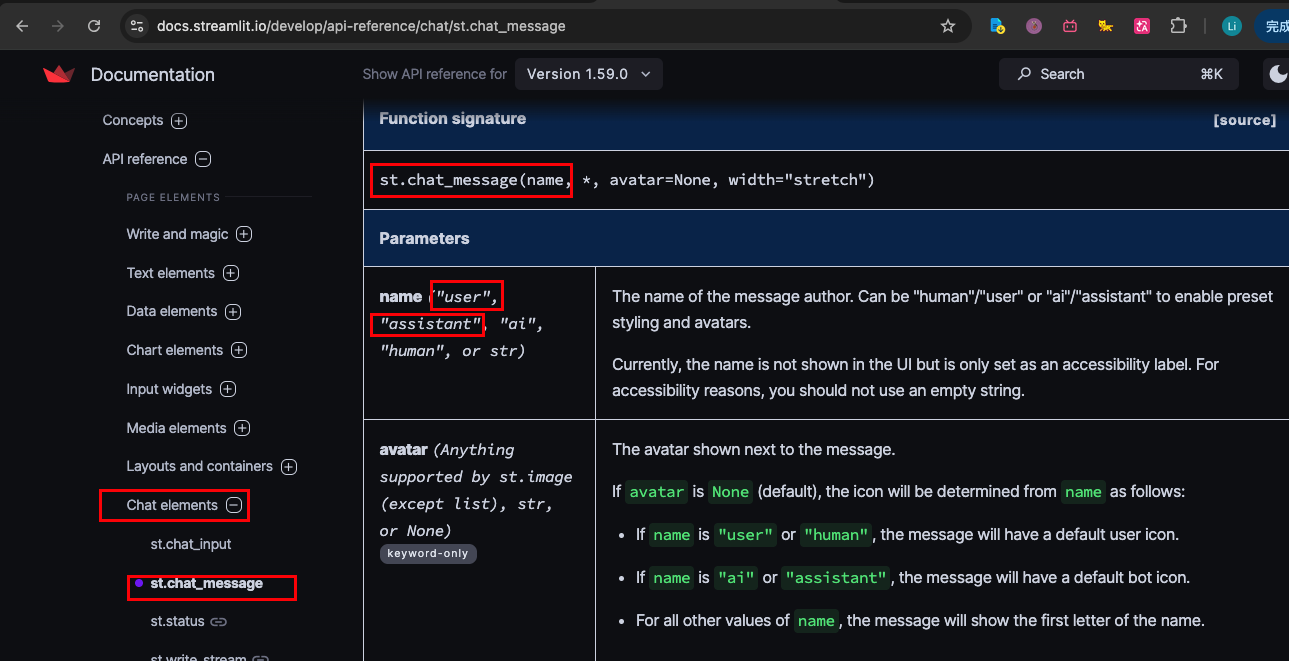
st.chat_input() st.chat_message()
文件位置:API reference/Chat elements/st.chat_input
文件位置:API reference/Chat elements/st.chat_message
1
2
3
4
5
6
7
8
9
10
11
12
13
14
15
16
17
18
19
20
21
22
23
24
25
26
27
28
29
30
31
32
33
34
35
36
import streamlit as st
from openai import OpenAI

st.set_page_config(
    page_title="Streamlit Example",
    page_icon="😁",
    layout="wide",
    initial_sidebar_state="expanded",
    menu_items={
        "About": "This is a example page.",
        "Get Help": "https://streamlit.io/",
    }
)

system_prompt = "You are a helpful assistant."

client = OpenAI(
    # Gemini 提供的 OpenAI 兼容 Base URL
    base_url="https://generativelanguage.googleapis.com/v1beta/openai/"
)

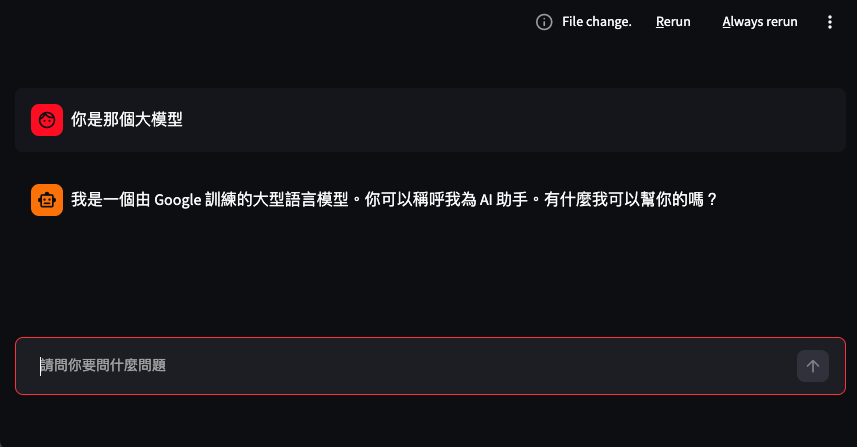
prompt = st.chat_input("請問你要問什麼問題")
if prompt:
    st.chat_message("user").write(prompt)

    response = client.chat.completions.create(
        # 使用 Gemini 的模型名稱
        model="gemini-3-flash-preview",
        messages=[
            {"role": "system", "content": system_prompt},
            {"role": "user", "content": prompt}
        ],
        stream=False  # 串流輸出, 注意是大寫的True
    )
    print(response.choices[0].message.content)
    st.chat_message("assistant").write(response.choices[0].message.content)
column
位置在 API reference/Layouts and containers/st.columns
https://docs.streamlit.io/develop/api-reference/layout/st.columns
st.columns(spec, *, gap="small", vertical_alignment="top", border=False, width="stretch")
spec寬度比例,可以是浮點數或整數
以下分成2欄,第1欄70%寬,第2欄30%寬
[0.7, 0.3]

以下分成6等份,第1欄佔1份,第2欄佔2份,第3欄佔3份
[1, 2, 3]
spec為分成幾等份,以下為範例:
1
2
3
4
5
6
7
8
9
10
11
12
13
14
15
16
17
import streamlit as st
# 分成3等份
# 分別為col1 col2 col3
col1, col2, col3 = st.columns(3)

# 每一等份中的組件內容
with col1:
    st.header("A cat")
    st.image("https://static.streamlit.io/examples/cat.jpg")

with col2:
    st.header("A dog")
    st.image("https://static.streamlit.io/examples/dog.jpg")

with col3:
    st.header("An owl")
    st.image("https://static.streamlit.io/examples/owl.jpg")