Fastapi
官網: https://fastapi.tiangolo.com/zh-hant/learn/
第一步: https://fastapi.tiangolo.com/zh-hant/tutorial/first-steps/
終端機安裝fastapi
pip install fastapi
pip install "fastapi[standard]"
測試程式碼
1
2
3
4
5
6
7
8
9
10
11
12
13
14
15
16
17
18
19
20
21
22
23
# imort fastapi
from fastapi import FastAPI
# 建立fastapi物件
app = FastAPI()

# 路徑函式
@app.get("/")
def root():
    return {"Hello": "World"}

@app.get("/users")
def get_users():
    return [
        {"id": 1, "name": "Mary"},
        {"id": 2, "name": "Bill"}
    ]

# fastapi server
if __name__ == '__main__':
    import uvicorn
    # app 為先前fastapi物件
    # 0.0.0.0 為任何電腦都可訪問,ip不限制
    uvicorn.run(app, host="0.0.0.0", port=8000)
執行終端機,ctrl + c可以關掉server
fastapi dev 檔名.py
執行完後,會告訴你,網址是http://127.0.0.1:8000
 ⚡️ Starting FastAPI in development mode

 🐍 Using import string: 12_fastapi:app

 🌐 Server started at http://127.0.0.1:8000
    Documentation at http://127.0.0.1:8000/docs
打開網址:http://127.0.0.1:8000
以下是內容:
{
"Hello": "World"
}
http://127.0.0.1:8000/users
[
{
"id": 1,
"name": "Mary"
},
{
"id": 2,
"name": "Bill"
}
]
Restful
網址通常為複數,如:users, books, items
- GET 查詢
- POST 新增
- PUT 修改
- DELETE 刪除
| 網址 | 請求方式 | 描述 |
|---|---|---|
| http://127.0.0.1:8000/users/1 | GET | 查詢id為1 |
| http://127.0.0.1:8000/users/1 | DELETE | 刪除id為1 |
| http://127.0.0.1:8000/users | POST | 新增 |
| http://127.0.0.1:8000/users | PUT | 修改 |
靜態檔案
FastAPI > 學習 > 教學 - 使用者指南 > 靜態檔案
網址: https://fastapi.tiangolo.com/zh-hant/tutorial/static-files/
import
from starlette.responses import FileResponse
from starlette.staticfiles import StaticFiles
1
2
app = FastAPI()
app.mount("/static", StaticFiles(directory="static"), name="static")
第一個參數 /static 指的下方程式碼中app.js放置目錄
index.html
<html>
<body>
	<script src="/static/app.js"></script>
</body>
</html>
第二個參數則是index.html與js檔案放置的真實目錄
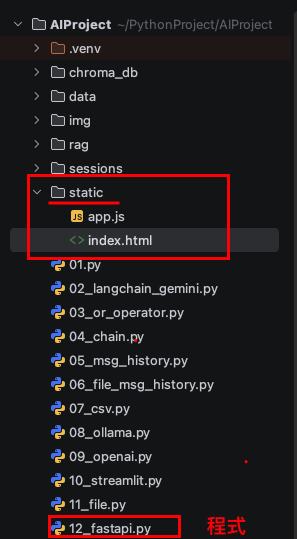
第三個參數 name=”static” 為它指定一個可供 FastAPI 內部使用的名稱。
return FileResponse("static/index.html")
- 第1個參數:任何以
/static開頭的路徑,都會由mount處理 - 第2個參數:html、css、js存放的目錄
- 第3個參數:指定一個可供 FastAPI 內部使用的名稱
完整程式碼
1
2
3
4
5
6
7
8
9
10
11
12
13
14
15
16
17
18
19
20
21
22
23
24
25
26
27
28
29
# imort fastapi
from fastapi import FastAPI
from starlette.responses import FileResponse
from starlette.staticfiles import StaticFiles

# 建立fastapi物件
app = FastAPI()

# 掛載靜態目錄
app.mount("/static", StaticFiles(directory="static"), name="static")

# 路徑函式
@app.get("/")
def root():
    return FileResponse("static/index.html")

@app.get("/users")
def get_users():
    return [
        {"id": 1, "name": "Mary"},
        {"id": 2, "name": "Bill"}
    ]

# fastapi server
if __name__ == '__main__':
    import uvicorn
    # app 為先前fastapi物件
    # 0.0.0.0 為任何電腦都可訪問,ip不限制
    uvicorn.run(app, host="0.0.0.0", port=8000)
建立目錄 與 日期
建立目錄
import
import os
1
2
if not os.path.exists('sessions'):
    os.mkdir('sessions')
日期產生session
from datetime import datetime
1
2
def generate_session_id():
    return datetime.now().strftime("%Y-%m-%d_%H-%M-%S")
session api
建立sessioin
1
2
3
4
5
6
7
8
9
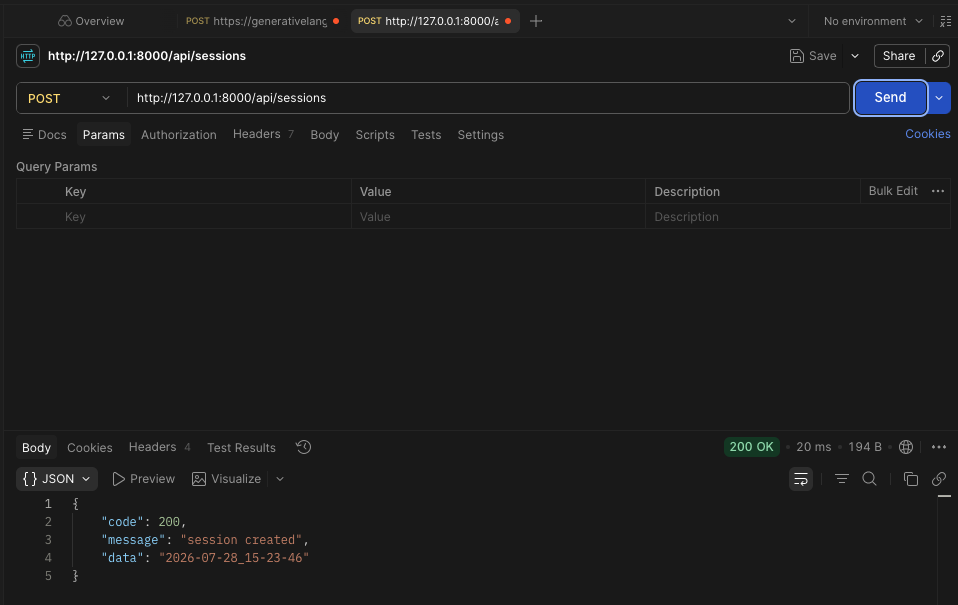
@app.post("/api/sessions")
def create_session():
    session_id = generate_session_id()
    session_data = {"session_id": session_id,
                    "messages": []}
    with open(os.path.join('sessions', session_id + ".json"), "w") as f:
        json.dump(session_data, f, ensure_ascii=False, indent=2)

    return {"code":200, "message":"session created", "data":session_id}
檢查是否有sessions目錄與建立日期檔案
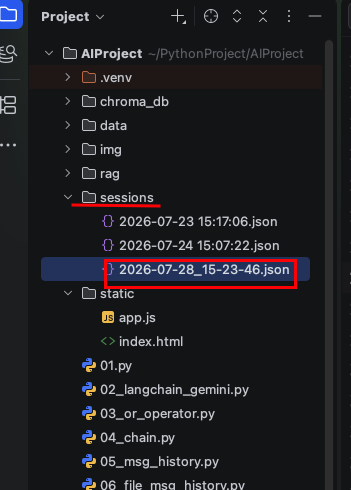
點擊檔案內容:
{
  "session_id": "2026-07-28_15-23-46",
  "messages": []
}
pydantic的BaseModel 父類別
FastAPI 學習 > 教學 - 使用者指南 > 回應模型 - 回傳型別
回應模型 - 回傳型別:https://fastapi.tiangolo.com/zh-hant/tutorial/response-model/
使用 Pydantic 將回傳資料序列化為 JSON
1
2
3
4
5
6
7
8
9
10
# FastApi Response 父類別
from pydantic import BaseModel
# 任意類型
from typing import Any

# 繼承父類別BaseModel
class ApiResponse(BaseModel):
    code: int
    message: str
    data: Any # 任意類別
修改一下回傳值
1
2
3
4
5
6
7
8
9
10
@app.post("/api/sessions")
def create_session():
    session_id = generate_session_id()
    session_data = {"session_id": session_id,
                    "messages": []}
    with open(os.path.join('sessions', session_id + ".json"), "w") as f:
        json.dump(session_data, f, ensure_ascii=False, indent=2)

    # 修改用ApiResponse回傳
    return ApiResponse(code=200, message="Session created successfully.", data=session_id)
postman 執行 Post http://127.0.0.1:8000/api/sessions
{
    "code": 200,
    "message": "Session created successfully.",
    "data": "2026-07-30_13-19-22"
}
處理Request
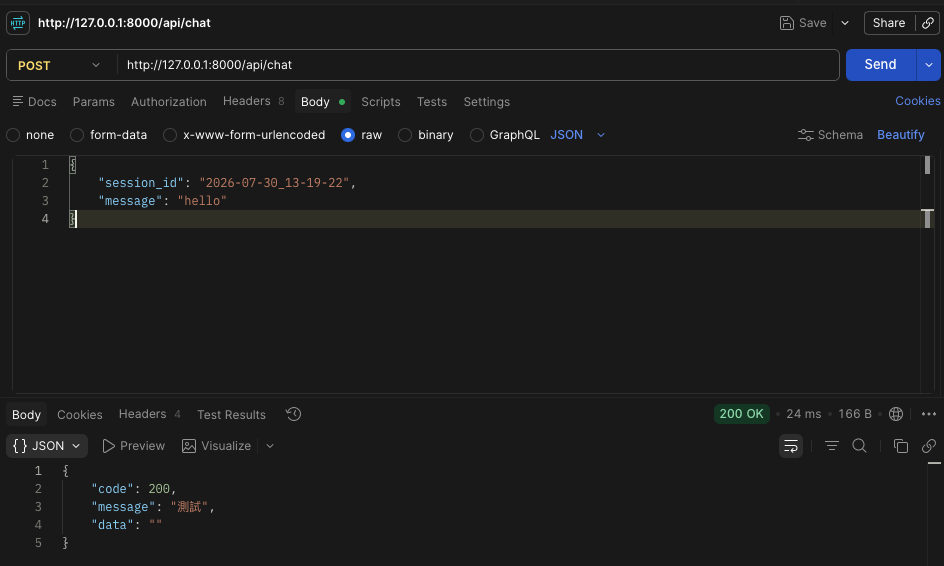
Post http://127.0.0.1:8000/api/chat
傳送的資料row
{
    "session_id": "2026-07-30_13-19-22",
    "message": "hello"
}
1
2
3
4
5
6
7
8
9
10
11
# Request父類別 繼承BaseModel
class ChatRequest(BaseModel):
    session_id: str
    message: str

# request 接收參數
@app.post("/api/chat")
def chat(request: ChatRequest) -> ApiResponse:
    # 輸出收到的參數
    print(f"session_id = {request.session_id}, message = {request.message}")
    return ApiResponse(code=200, message="測試", data="")
1
2
3
# 取得session檔案
def get_session_file_name(session_id):
    return f"sessions/{session_id}.json"
完整程式碼
1
2
3
4
5
6
7
8
9
10
11
12
13
14
15
16
17
18
19
20
21
22
23
24
25
26
27
28
29
30
31
32
33
34
35
36
37
38
39
40
41
42
43
44
45
46
47
48
49
50
51
52
53
54
55
56
57
58
59
60
61
62
63
64
65
66
67
68
69
70
71
72
73
74
75
76
77
78
79
80
81
82
83
84
85
86
87
88
89
90
91
92
93
94
95
96
97
98
99
100
101
102
103
104
105
106
107
108
109
110
111
112
113
114
115
116
117
118
119
120
121
122
import json
import os
from datetime import datetime
from typing import Any

from fastapi import FastAPI
from pydantic import BaseModel
from starlette.responses import FileResponse
from starlette.staticfiles import StaticFiles
from openai import OpenAI

# 建立fastapi物件
app = FastAPI()
# 掛載(mounting)
# 第一個 "/static" 指的是這個「子應用」要被「掛載」的子路徑。因此,任何以 "/static" 開頭的路徑都會由它處理。
# directory="static" 指向包含你靜態檔案的目錄名稱。
# name="static" 為它指定一個可供 FastAPI 內部使用的名稱。
app.mount("/static", StaticFiles(directory="static"), name="static")

if not os.path.exists('sessions'):
    os.mkdir('sessions')

# 取得session_id
def generate_session_id():
    return datetime.now().strftime("%Y-%m-%d_%H-%M-%S")


# 取得session檔案
def get_session_file_name(session_id):
    return f"sessions/{session_id}.json"

# 建立session_id檔案
@app.post("/api/sessions")
def create_session():
    session_id = generate_session_id()
    session_data = {"session_id": session_id,
                    "messages": []}
    with open(os.path.join('sessions', session_id + ".json"), "w") as f:
        json.dump(session_data, f, ensure_ascii=False, indent=2)

    return ApiResponse(code=200, message="Session created successfully.", data=session_id)

# 傳回值類型 父類別
class ApiResponse(BaseModel):
    code: int
    message: str
    data: Any

# Request 父類別
class ChatRequest(BaseModel):
    session_id: str
    message: str

# ai
client = OpenAI(
    # Gemini 提供的 OpenAI 兼容 Base URL
    base_url="https://generativelanguage.googleapis.com/v1beta/openai/"
)

# 處理與ai 聊天
@app.post("/api/chat")
def chat(request: ChatRequest) -> ApiResponse:
    # print(f"session_id = {request.session_id}, message = {request.message}")
    # 取得session_id 檔案
    session_path = get_session_file_name(request.session_id)
    with open(session_path, "r", encoding="utf-8") as f:
        # 將檔案內容轉成json
        session_data = json.load(f)
    # 系統提示詞
    messages = [{"role": "system", "content": "你的名字是王小美,身份是好朋友"}]

    # 取得session_id檔案中的對話記錄
    for message in session_data["messages"]:
        messages.append(message)

    # user的訊息
    messages.append({"role": "user", "content": request.message})

    # 問AI
    response = client.chat.completions.create(
        # 使用 Gemini 的模型名稱
        model="gemini-3-flash-preview",
        messages=messages,
        stream=False  # 串流輸出, 注意是大寫的True
    )

    # ai回覆
    ai_response = response.choices[0].message.content

    # 移掉系統提示詞
    messages.pop(0)
    # 加上ai回覆(讓ai有記憶)
    messages.append({"role": "assistant", "content": ai_response})
    # 將新的messages 存入session_data["messages"]
    session_data["messages"] = messages
    # 將messages對話內容存入session_id檔案
    with open(session_path, "w", encoding="utf-8") as f:
        json.dump(session_data, f, ensure_ascii=False, indent=2)
    # 傳回值
    return ApiResponse(code=200, message="成功取得AI回覆", data=ai_response)

# 路徑函式
@app.get("/")
def root():
    return FileResponse("static/index.html")


@app.get("/users")
def get_users():
    return [
        {"id": 1, "name": "Mary"},
        {"id": 2, "name": "Bill"}
    ]


# fastapi server
if __name__ == '__main__':
    import uvicorn

    # app 為先前fastapi物件
    # 0.0.0.0 為任何電腦都可訪問,ip不限制
    uvicorn.run(app, host="0.0.0.0", port=8000)
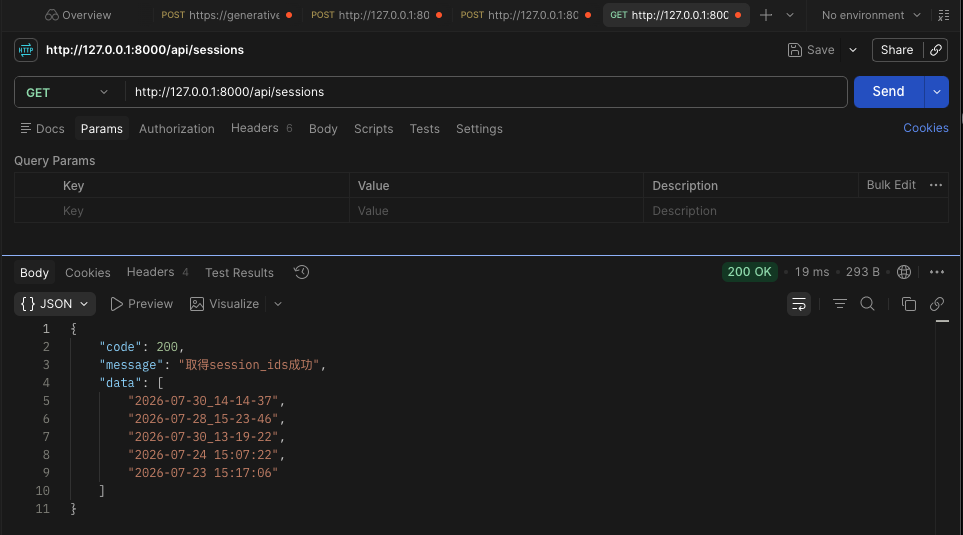
取得 session_ids
1
2
3
4
5
6
7
8
9
# 取得sessions List
@app.get("/api/sessions")
def get_sessions() -> ApiResponse:
    # 取得sessions目錄下所有檔案
    session_files = os.listdir("sessions")

    # 取得session_ids
    session_ids = [file.split(".")[0] for file in session_files]
    return ApiResponse(code=200, message="取得session_ids成功", data=session_ids)
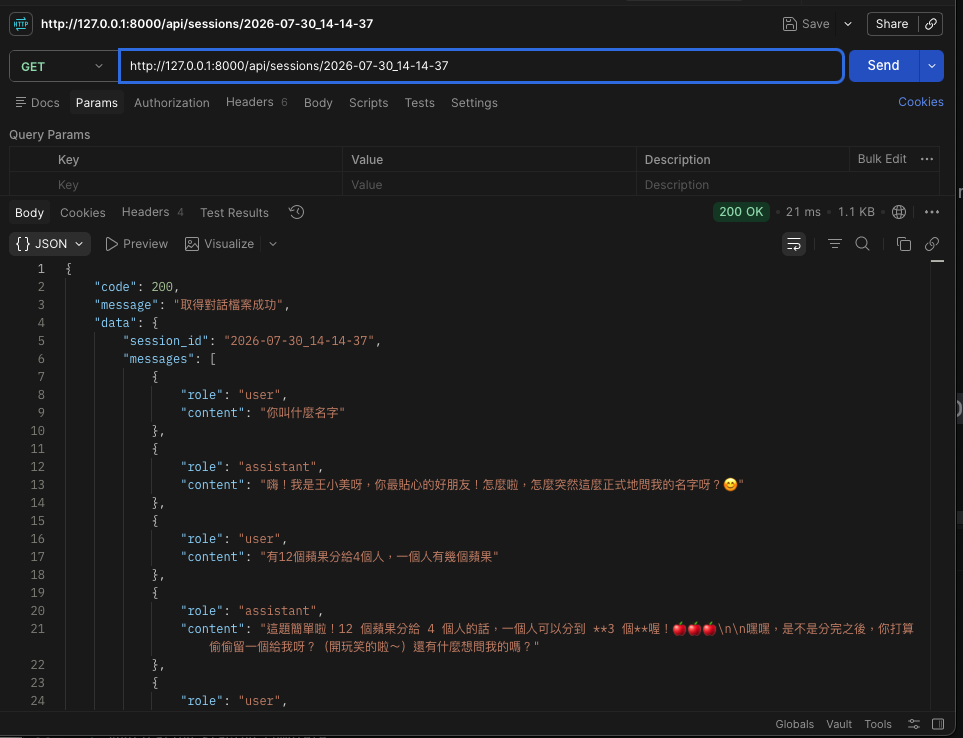
取得單獨session_id
1
2
3
4
5
6
@app.get("/api/sessions/{session_id}")
def get_session(session_id: str) -> ApiResponse:
    session_file = get_session_file_name(session_id)
    with open(session_file, "r", encoding="utf-8") as f:
        session_data = json.load(f)
    return ApiResponse(code=200,message="取得對話檔案成功",data=session_data)