import
模組就是寫一個py檔案,把許多函式放在裡面,這個py檔案就是模組。
使用前要import。
import 其它模組的函式
test2.py檔案 內容如下:
1
2
def add(x, y):
    return x + y
模組語法:
import 檔名
檔名不包含.py
建立一個新的test1.py檔案,程式碼內容如下:
1
2
3
4
5
6
# import test2檔名(不包含.py)
import test2

# 使用test2.py檔案中 add() 函式
result = test2.add(10, 20)
print(result)
30
import 標準函式庫
Python有提供標準函式庫。
請在以下搜尋「標準函式」
https://docs.python.org/zh-tw/3.12/tutorial/index.html
1
2
3
4
5
6
7
import math
import random

# 取出絕對值
print(math.fabs(-100))
# 從list中隨機傳回其中的元素
print(random.randint(1,100))
100.0
48
也可以把 import 寫在一起。
1
import math,random
from 模組 import 函式
上一個呼叫函式,需要模組.函式()。
使用from 模組 import 函式,就直接呼叫函式()就可以。
1
2
from random import choice
print(choice(['Hello', 'Marry', 'Happy']))
from 模組 import *
使用 * 號,就可以匯入所有函式。
1
2
3
4
from random import *
print(choice(['Hello', 'Marry', 'Happy']))
# 產生 1 - 100(包含100) 之間的數字
print(randint(1, 100))
Marry
91
import 模組 as 名稱
可以為模組取客制化的名稱。
以下程式碼,r就是自己取的名稱。
1
2
3
4
import random as r
print(r.choice(['Hello', 'Marry', 'Happy']))
# 產生 1 - 100(包含100) 之間的數字
print(r.randint(1, 100))
Marry
91
from 模組 import 函式 as 名稱
可以為函式取客制化的名稱。
1
2
from random import choice as mychoice
print(mychoice(['Hello', 'Marry', 'Happy']))
__name__
test2.py 輸出__name__
1
2
3
def add(x, y):
    return x + y
print("test2.py :" + __name__)
test1.py 輸出__name__
1
2
3
4
import test2

print(test2.add(5,6))
print("test1.py :" + __name__)
執行test1.py
test2.py :test2
11
test1.py :__main__
由上面的結果可以發現,test1.py 呼叫 test2模組中的 add() 函式。
test1.py 是呼叫方, __name__ 輸出為__main__ 。
test2.py 是被呼叫方, __name__ 輸出為 test2 。
由此可知,呼叫函式的那一方,輸出的都是__main__ 代表它是「主要」函式。
測試模組
如果開發test2模組時,在test2模組呼叫add()函式,但忘記註解。
test2.py
1
2
3
4
5
def add(x, y):
    return x + y

# 測試用
print(add(100, 50))
test1.py 使用test2模組,並呼叫add()函式。
1
2
3
import test2

print(test2.add(5,6))
執行結果就會把測試用print(add(100, 50)),也印出來。
150
11
如何讓主函式呼叫模組時,測試用的程式碼不被呼叫呢?但模組自己測試的時候又可以呼叫。
使用 __name__ 可以分辦執行函式的人是誰,若執行函式的人是自己, __name__ 就會是main,如果是作為模組函式執行, __name__ 就會是模組名test2。
test2.py
1
2
3
4
5
6
def add(x, y):
    return x + y

# 測試用
if __name__ == '__main__':
    print(add(100, 50))
__all__
__all__ 只能用在 from 模組 import 函式
設定要開放那些函式給其它人呼叫。
test2.py 有add()、minus()、div()、mul(),但利用 __all__,只開放add()函式供其它人使用。
1
2
3
4
5
6
7
8
9
10
11
12
__all__ = ['add']
def add(x, y):
    return x + y

def minus(x, y):
    return x - y

def div(x, y):
    return x / y

def mul(x, y):
    return x * y
test1.py 使用from 模組 import 函式的方式匯入test2所有方法。
以下程式碼使用minus()會編譯時期的錯誤。
1
2
3
4
from test2 import *

print(add(5,6))
print(minus(5,6))
但若使用import 模組,則可以使用test2中所有函式。
1
2
3
4
import test2

print(test2.add(5,6))
print(test2.minus(5,6))
11
-1
ctrl + b 查看模組所有函式
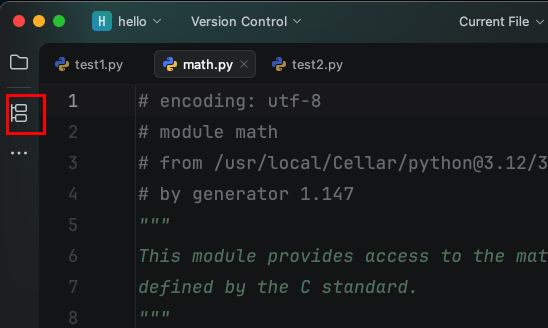
滑鼠游標移到「math」之間,windows按 ctrl + b , mac 按 cmd + b,就會進入模組文件
1
import math
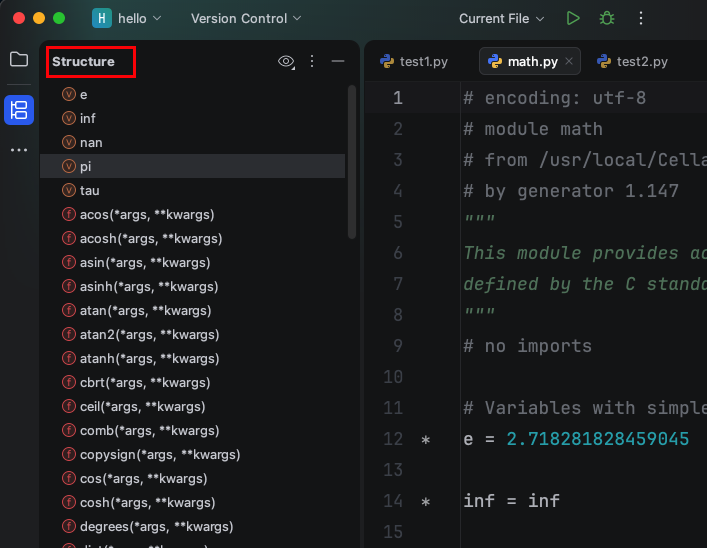
點擊下圖Structure ,就會展示 module 所有函式。
alt + enter 導入不知道的模組
不知道fabs的函式是那個 module,滑鼠游標移到「fabs」之間,使用alt + enter,就會列出所有選擇,第一種選擇是import ,第二種選擇是安裝模組(預設最新版本)並import模組。
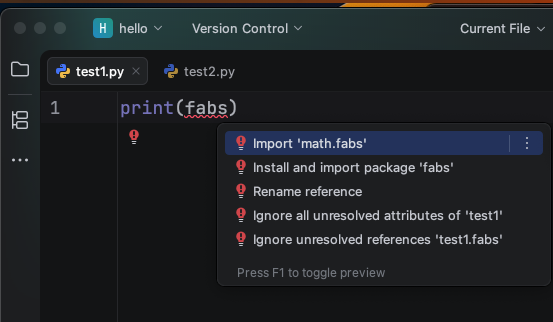
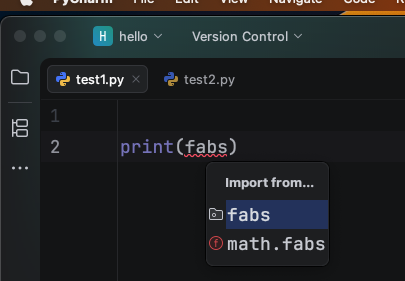
如果選擇第一種「import this name」,會有以下二種選擇,第一種是「import 模組」,第二種是「from 模組 import 函式」,會自動產生,不用自己輸入。
shift + alt + enter 導入模組
shift + alt + enter,會有以下二種選擇,第一種是「import 模組」,第二種是「from 模組 import 函式」,會自動產生,不用自己輸入。