安裝flutter
OS 版本 : macOS 13
git clone flutter
從來沒有 git clone flutter
# 切换到指定版本
cd ~/flutter  # 或者你的 Flutter 安装目录
git clone https://github.com/flutter/flutter.git -b 3.16.9 --depth 1
曾經 git clone flutter
# 如果已经安装了 Flutter,可以切换版本
cd [你的 flutter 路径]
git checkout 3.16.9
修改zshrc
編輯
vi ~/.zshrc
增加flutter bin 執行檔目錄
export PATH="安裝路徑/flutter/bin:$PATH"
儲存
source ~/.zshrc
version
會安裝跟版本相對應的工具
flutter --version
檢查環境
flutter doctor -v
TRAE
打開TRAE,安裝flutter與 Awesome Flutter Snippets
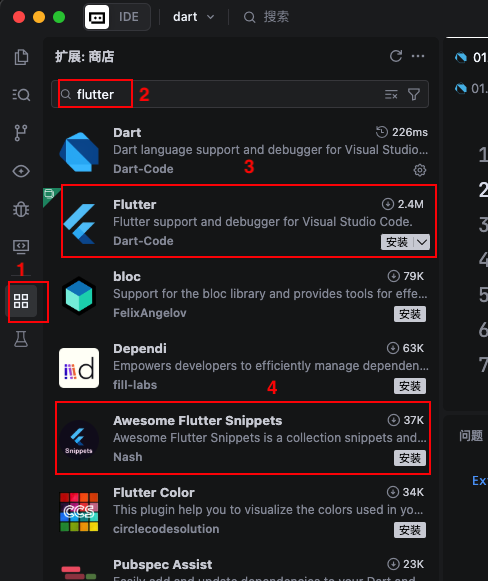
建立專案
建立一個目錄
使用終端機
cd 你剛才建的目錄
flutter create --platforms web 你要建立的專案
專案會在原本的目錄下,再建立一個子目錄,目錄名與專案名一樣
我實際輸入
% cd flutterProj
% flutter create --platforms web flutter_base
打開專案
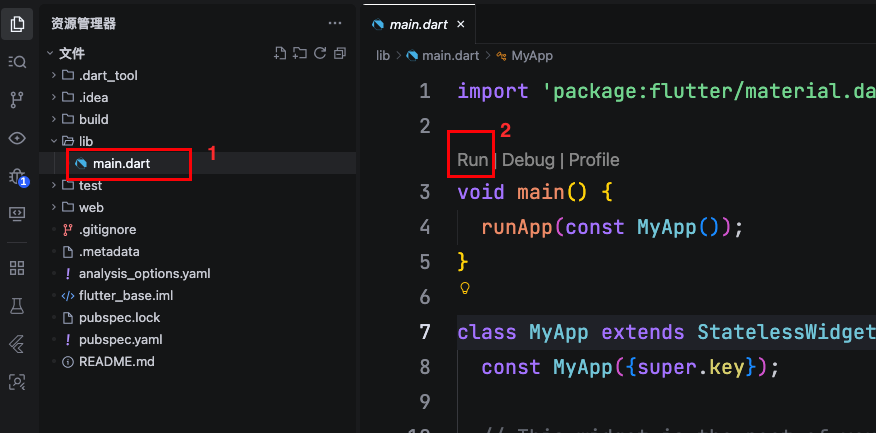
打開專案,打開lib目錄下main.dart,點擊main()主函式上方的Run,參考下圖:
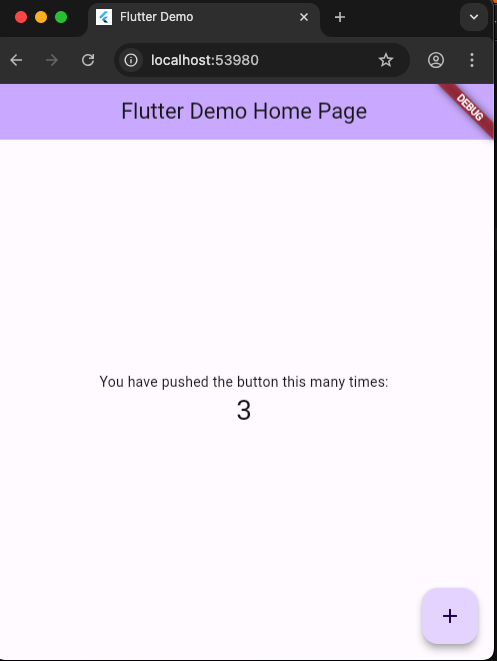
就會執行chrome
步驟一:打開另一個終端機或 VS Code 視窗,啟動你的 Python Agent,讓它上線等待。
步驟二:回到你目前的 Flutter 專案,執行 flutter run 把前端介面打開。
步驟三:當你在 Flutter App 點擊連線或進入房間時,Python Agent 就會被觸發並加入同一個房間,開始和你對話並傳送 Avatar 畫面!
/etc/zshrc:7: command not found: locale
cici@liyutingdeMacBook-Pro livekit-flutter % lk cloud auth
Saved CLI config to [/Users/cici/.livekit/cli-config.yaml]
Device [avatar_flutter]
Requesting verification token...
Please confirm access by visiting:

   https://cloud.livekit.io/cli/confirm-auth?t=69b68b26-6e96-473b-b7ad-a93ba99f9ec4
Authenticated project [avatar_flutter]
Saved CLI config to [/Users/cici/.livekit/cli-config.yaml]
cici@liyutingdeMacBook-Pro livekit-flutter % lk app create
Using project [avatar-flutter]
Cloning template...
Instantiating environment...
Installing template...
⚠  Installation failed — dependencies were NOT installed
┃ task "install" not found
┃ Fix your toolchain, then re-run the install step manually in ./avatar-flutter.
Cleaning up...

Your Flutter voice assistant is ready to go!

To give it a try:
    cd /Users/cici/Desktop/Livekit/livekit-flutter/avatar-flutter
    flutter pub get
    flutter run

For more help view your project's README.md file or join our Slack community at https://livekit.io/join-slack.
cici@liyutingdeMacBook-Pro livekit-flutter % ls
avatar-flutter
cici@liyutingdeMacBook-Pro livekit-flutter % cd avatar-flutter
cici@liyutingdeMacBook-Pro avatar-flutter % ls
README.md               devtools_options.yaml   pubspec.yaml
analysis_options.yaml   ios                     test
android                 lib                     web
assets                  macos
cici@liyutingdeMacBook-Pro avatar-flutter % flutter pub get
Resolving dependencies...
The current Dart SDK version is 3.2.6.

Because voice_assistant requires SDK version ^3.10.0, version solving failed.
cici@liyutingdeMacBook-Pro avatar-flutter % flutter upgrade
Unable to upgrade Flutter: Your Flutter checkout is currently not on a release branch.
Use "flutter channel" to switch to an official channel, and retry. Alternatively,
re-install Flutter by going to https://flutter.dev/docs/get-started/install.
cici@liyutingdeMacBook-Pro avatar-flutter % flutter --version
Flutter 3.16.9 • channel [user-branch] • unknown source
Framework • revision 41456452f2 (2 years, 8 months ago) • 2024-01-25 10:06:23 -0800
Engine • revision f40e976bed
Tools • Dart 3.2.6 • DevTools 2.28.5
cici@liyutingdeMacBook-Pro avatar-flutter % flutter pub get
Downloading package sky_engine...                                1,595ms
Downloading flutter_patched_sdk tools...                         1,817ms
Downloading flutter_patched_sdk_product tools...                 1,880ms
Downloading darwin-x64 tools...                                    16.2s
Downloading darwin-x64/font-subset tools...                      1,511ms
Resolving dependencies...
The current Dart SDK version is 3.4.0.

Because voice_assistant requires SDK version ^3.10.0, version solving failed.
cici@liyutingdeMacBook-Pro avatar-flutter % flutter pub get
Resolving dependencies...
The current Flutter SDK version is 3.22.0.

Because voice_assistant requires Flutter SDK version
  >=3.38.0, version solving failed.
cici@liyutingdeMacBook-Pro avatar-flutter % flutter pub get
Resolving dependencies... (1.0s)
The current Dart SDK version is 3.4.0.

Because voice_assistant depends on flutter_lints >=5.0.0
  which requires SDK version >=3.5.0 <4.0.0, version solving
  failed.
cici@liyutingdeMacBook-Pro avatar-flutter % flutter pub get
Resolving dependencies... (1.1s)
The current Dart SDK version is 3.4.0.

Because voice_assistant depends on livekit_components >=1.0.1
  which requires SDK version >=3.5.1 <4.0.0, version solving
  failed.
cici@liyutingdeMacBook-Pro avatar-flutter % flutter pub get
Resolving dependencies... (1.4s)
The current Dart SDK version is 3.4.0.

Because voice_assistant depends on livekit_components >=1.0.1
  which requires SDK version >=3.5.1 <4.0.0, version solving
  failed.
cici@liyutingdeMacBook-Pro avatar-flutter % flutter pub get
Error detected in pubspec.yaml:
Error on line 42, column 3: Duplicate mapping key.
   ╷
42 │   livekit_client: ^2.5.0
   │   ^^^^^^^^^^^^^^
   ╵
Please correct the pubspec.yaml file at
/Users/cici/Desktop/Livekit/livekit-flutter/avatar-flutter/pubs
pec.yaml
cici@liyutingdeMacBook-Pro avatar-flutter % flutter pub get
Resolving dependencies... (1.2s)
The current Dart SDK version is 3.4.0.

Because voice_assistant depends on livekit_client >=2.4.1
  which requires SDK version >=3.6.0 <4.0.0, version solving
  failed.


You can try the following suggestion to make the pubspec resolve:
* Consider downgrading your constraint on livekit_client: flutter pub add livekit_client:^2.3.6
cici@liyutingdeMacBook-Pro avatar-flutter % flutter pub get
Resolving dependencies... (1.6s)
Downloading packages... (25.6s)
+ args 2.7.0
+ async 2.11.0 (2.13.1 available)
+ boolean_selector 2.1.1 (2.1.2 available)
+ characters 1.3.0 (1.4.1 available)
+ chat_bubbles 1.9.2 (1.10.1 available)
+ clock 1.1.1 (1.1.3 available)
+ collection 1.18.0 (1.19.1 available)
+ connectivity_plus 6.1.5 (7.3.1 available)
+ connectivity_plus_platform_interface 2.1.0
+ crypto 3.0.7
+ cupertino_icons 1.0.8 (1.0.9 available)
+ dart_webrtc 1.8.2
+ dbus 0.7.12 (0.8.0 available)
+ device_info_plus 11.3.0 (13.2.0 available)
+ device_info_plus_platform_interface 7.0.2 (8.1.0 available)
+ fake_async 1.3.1 (1.3.3 available)
+ ffi 2.1.3 (2.2.0 available)
+ file 7.0.1
+ fixnum 1.1.1
+ flutter 0.0.0 from sdk flutter
+ flutter_dotenv 6.0.1
+ flutter_lints 4.0.0 (6.0.0 available)
+ flutter_sficon 1.3.0
+ flutter_test 0.0.0 from sdk flutter
+ flutter_web_plugins 0.0.0 from sdk flutter
+ flutter_webrtc 0.12.12+hotfix.1 (1.6.2+hotfix.3 available)
+ http 1.6.0
+ http_parser 4.0.2 (4.1.2 available)
+ intl 0.20.2 (0.20.3 available)
+ js 0.7.1 (0.7.2 available)
+ leak_tracker 10.0.4 (11.0.2 available)
+ leak_tracker_flutter_testing 3.0.3 (3.0.10 available)
+ leak_tracker_testing 3.0.1 (3.0.2 available)
+ lints 4.0.0 (6.1.0 available)
+ livekit_client 2.3.6 (2.13.0 available)
+ logging 1.3.0
+ matcher 0.12.16+1 (0.12.20 available)
+ material_color_utilities 0.8.0 (0.13.1 available)
+ meta 1.12.0 (1.19.0 available)
+ nested 1.0.0
+ nm 0.5.0 (0.6.0 available)
+ path 1.9.0 (1.9.1 available)
+ path_provider 2.1.5 (2.1.6 available)
+ path_provider_android 2.2.10 (2.3.1 available)
+ path_provider_foundation 2.4.1 (2.6.0 available)
+ path_provider_linux 2.2.1 (2.2.2 available)
+ path_provider_platform_interface 2.1.2 (2.1.3 available)
+ path_provider_windows 2.3.0
+ petitparser 6.0.2 (7.0.2 available)
+ platform 3.1.6 (3.2.0 available)
+ platform_detect 2.1.0 (2.1.6 available)
+ plugin_platform_interface 2.1.8
+ protobuf 3.1.0 (6.1.0 available)
+ provider 6.1.5+1
+ pub_semver 2.2.1
+ sdp_transform 0.3.2
+ shimmer 3.0.0 (4.0.0 available)
+ sky_engine 0.0.99 from sdk flutter
+ source_span 1.10.0 (1.10.2 available)
+ stack_trace 1.11.1 (1.12.2 available)
+ stream_channel 2.1.2 (2.1.4 available)
+ string_scanner 1.2.0 (1.4.1 available)
+ synchronized 3.1.0+1 (3.4.2 available)
+ term_glyph 1.2.1 (1.2.2 available)
+ test_api 0.7.0 (0.7.14 available)
+ typed_data 1.3.2 (1.4.0 available)
+ url_launcher 6.3.1 (6.3.2 available)
+ url_launcher_android 6.3.9 (6.3.33 available)
+ url_launcher_ios 6.3.3 (6.4.2 available)
+ url_launcher_linux 3.2.1 (3.2.3 available)
+ url_launcher_macos 3.2.2 (3.2.6 available)
+ url_launcher_platform_interface 2.3.2
+ url_launcher_web 2.3.3 (2.4.3 available)
+ url_launcher_windows 3.1.4 (3.1.6 available)
+ uuid 4.6.0
+ vector_math 2.1.4 (2.4.3 available)
+ vm_service 14.2.1 (15.3.0 available)
+ web 1.1.1
+ webrtc_interface 1.5.1
+ win32 5.5.4 (6.4.0 available)
+ win32_registry 1.1.5 (3.0.3 available)
+ xdg_directories 1.1.0
+ xml 6.5.0 (7.0.1 available)
Changed 83 dependencies!
58 packages have newer versions incompatible with dependency constraints.
Try `flutter pub outdated` for more information.
cici@liyutingdeMacBook-Pro avatar-flutter %
name: voice_assistant
description: "A sample AI Voice Assistant app built on LiveKit Agents"
# The following line prevents the package from being accidentally published to
# pub.dev using `flutter pub publish`. This is preferred for private packages.
publish_to: 'none' # Remove this line if you wish to publish to pub.dev

# The following defines the version and build number for your application.
# A version number is three numbers separated by dots, like 1.2.43
# followed by an optional build number separated by a +.
# Both the version and the builder number may be overridden in flutter
# build by specifying --build-name and --build-number, respectively.
# In Android, build-name is used as versionName while build-number used as versionCode.
# Read more about Android versioning at https://developer.android.com/studio/publish/versioning
# In iOS, build-name is used as CFBundleShortVersionString while build-number is used as CFBundleVersion.
# Read more about iOS versioning at
# https://developer.apple.com/library/archive/documentation/General/Reference/InfoPlistKeyReference/Articles/CoreFoundationKeys.html
# In Windows, build-name is used as the major, minor, and patch parts
# of the product and file versions while build-number is used as the build suffix.
version: 1.0.0+14

environment:
  sdk: ">=3.4.0 <4.0.0"
  # sdk: ^3.10.0
  flutter: ">=3.22.0"

# Dependencies specify other packages that your package needs in order to work.
# To automatically upgrade your package dependencies to the latest versions
# consider running `flutter pub upgrade --major-versions`. Alternatively,
# dependencies can be manually updated by changing the version numbers below to
# the latest version available on pub.dev. To see which dependencies have newer
# versions available, run `flutter pub outdated`.
dependencies:
  flutter:
    sdk: flutter
  #livekit_components: ^1.3.1

  # The following adds the Cupertino Icons font to your application.
  # Use with the CupertinoIcons class for iOS style icons.
  cupertino_icons: ^1.0.8
  chat_bubbles: ^1.6.0
  livekit_client: ^2.3.6
  flutter_dotenv: ^6.0.0
  http: ^1.3.0
  provider: ^6.1.2
  url_launcher: ^6.3.1
  shimmer: ^3.0.0
  uuid: ^4.5.1
  flutter_sficon: ^1.2.0
  intl: ^0.20.0
  logging: ^1.3.0

dev_dependencies:
  flutter_test:
    sdk: flutter

  # The "flutter_lints" package below contains a set of recommended lints to
  # encourage good coding practices. The lint set provided by the package is
  # activated in the `analysis_options.yaml` file located at the root of your
  # package. See that file for information about deactivating specific lint
  # rules and activating additional ones.
  flutter_lints: ^4.0.0

# For information on the generic Dart part of this file, see the
# following page: https://dart.dev/tools/pub/pubspec

# The following section is specific to Flutter packages.
flutter:

  # The following line ensures that the Material Icons font is
  # included with your application, so that you can use the icons in
  # the material Icons class.
  uses-material-design: true

  # To add assets to your application, add an assets section, like this:
  # The assets/ directory also picks up the optional assets/.env file when
  # present (declared file assets must exist, directory contents may vary).
  assets:
    - assets/
  #   - images/a_dot_burr.jpeg
  #   - images/a_dot_ham.jpeg

  # An image asset can refer to one or more resolution-specific "variants", see
  # https://flutter.dev/to/resolution-aware-images

  # For details regarding adding assets from package dependencies, see
  # https://flutter.dev/to/asset-from-package

  # To add custom fonts to your application, add a fonts section here,
  # in this "flutter" section. Each entry in this list should have a
  # "family" key with the font family name, and a "fonts" key with a
  # list giving the asset and other descriptors for the font. For
  # example:
  # fonts:
  #   - family: Schyler
  #     fonts:
  #       - asset: fonts/Schyler-Regular.ttf
  #       - asset: fonts/Schyler-Italic.ttf
  #         style: italic
  #   - family: Trajan Pro
  #     fonts:
  #       - asset: fonts/TrajanPro.ttf
  #       - asset: fonts/TrajanPro_Bold.ttf
  #         weight: 700
  #
  # For details regarding fonts from package dependencies,
  # see https://flutter.dev/to/font-from-package