Weight 權重
Prerequisites:
語法
Modifier.weight(浮點數f)
Modifier.weight(1f)
參數是浮點數,後面要加上f。
只有一個子元件設定weight
如果子元件沒有設定weight,那它的大小就是它原本的大小,若有設定weight,則會在一個空間中,扣掉其它原本的大小,剩下的空間,就是給設定weight的子元件。
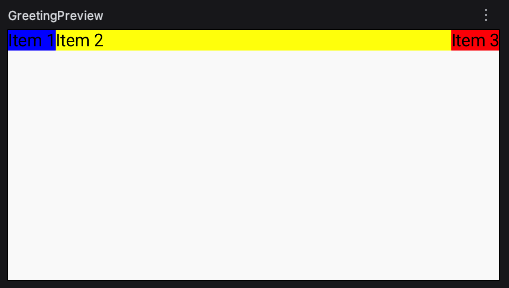
以下只有Item2有設定權重,扣掉Item1與Item3的寬度,剩下的寬度就是Item2的寬度。
1
2
3
4
5
6
7
8
9
10
11
12
13
14
15
16
17
18
19
20
21
22
@Composable
fun testRow() {
  Row(
    modifier = Modifier
      .fillMaxWidth()
      .height(200.dp)
  ) {
    Text(
      "Item 1", modifier = Modifier
        .background(Color.Blue)
    )
    Text(
      "Item 2", modifier = Modifier
        .background(Color.Yellow)
        .weight(1f)
    )
    Text(
      "Item 3", modifier = Modifier
        .background(Color.Red)
    )
  }
}
weight比重
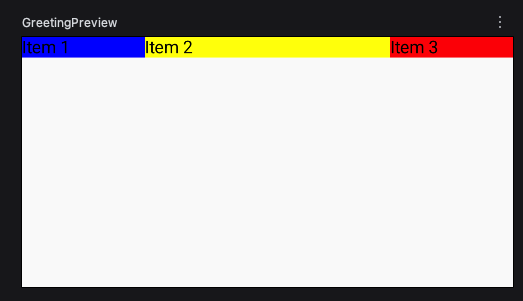
以下範例,Item2有2個weight,佔2等份,Item1與Item3只有1個weight,各佔1等份。
全部的weight是4個,Item2佔4分之2,Item1與Item3各佔4分之1。
1
2
3
4
5
6
7
8
9
10
11
12
13
14
15
16
17
18
19
20
21
22
23
24
@Composable
fun testRow() {
  Row(
    modifier = Modifier
      .fillMaxWidth()
      .height(200.dp)
  ) {
    Text(
      "Item 1", modifier = Modifier
        .background(Color.Blue)
        .weight(1f)
    )
    Text(
      "Item 2", modifier = Modifier
        .background(Color.Yellow)
        .weight(2f)
    )
    Text(
      "Item 3", modifier = Modifier
        .background(Color.Red)
        .weight(1f)
    )
  }
}
平均分配
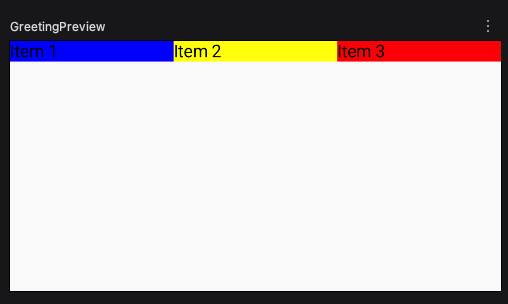
全部都設1f。
1
2
3
4
5
6
7
8
9
10
11
12
13
14
15
16
17
18
19
20
21
22
23
24
@Composable
fun testRow() {
  Row(
    modifier = Modifier
      .fillMaxWidth()
      .height(200.dp)
  ) {
    Text(
      "Item 1", modifier = Modifier
        .background(Color.Blue)
        .weight(1f)
    )
    Text(
      "Item 2", modifier = Modifier
        .background(Color.Yellow)
        .weight(1f)
    )
    Text(
      "Item 3", modifier = Modifier
        .background(Color.Red)
        .weight(1f)
    )
  }
}