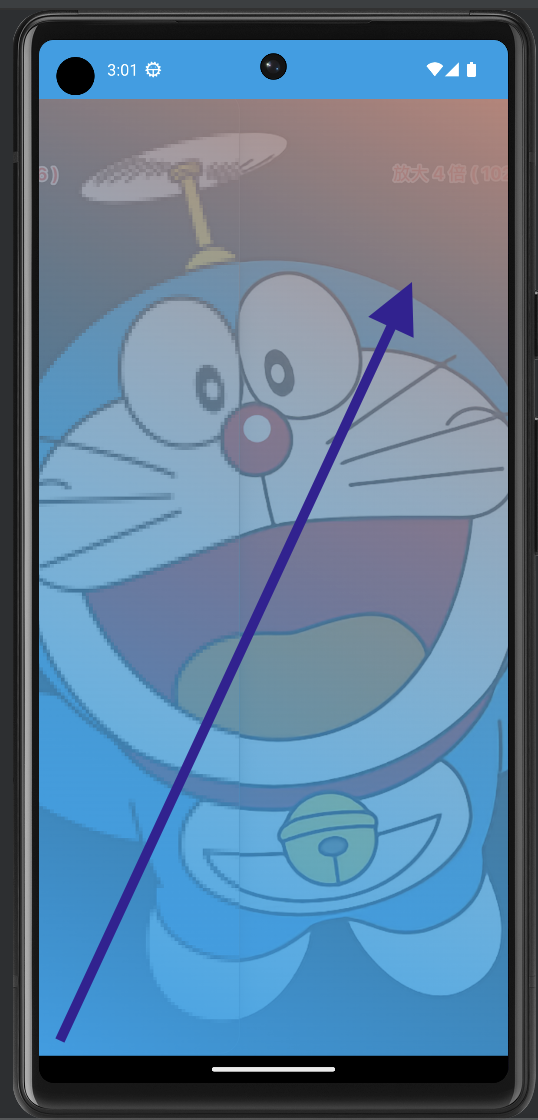
背景顏色漸變
Brush
Brush,中文翻譯成筆刷,可以讓背景顏色有漸變效果。
brush是background的參數。
1
2
3
4
5
6
Modifier
  .background(
    brush = Brush.horizontalGradient(
      colors = listOf(Color.Red, Color.Blue)
    )
  )
Brush語法
Brush.漸變方式(
  colors = listOf(顏色1, 顏色2)
)
Brush.linearGradient(
  colors = listOf(Color.Red, Color.Blue)
)
Brush下面有幾種漸變的方式。
| 漸變函式 | 顏色 | 方向 | 解釋 |
|---|---|---|---|
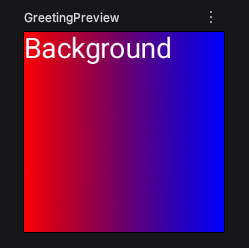
| horizontalGradient | listOf(Color.Red, Color.Blue) | 由左至右變色 | 最左邊是紅色漸變成最右邊是藍色 |
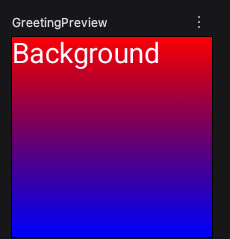
| verticalGradient | listOf(Color.Red, Color.Blue) | 由上至下 | 上面是紅色漸變成下面是藍色 |
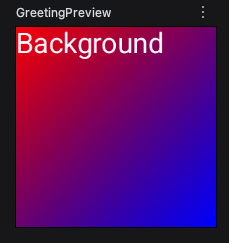
| linearGradient | listOf(Color.Red, Color.Blue) | 由左上至右下 | 左上是紅色漸變成右下是藍色 |
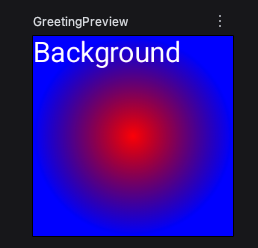
| radialGradient | listOf(Color.Red, Color.Blue) | 由中心到外圍 | 中心是紅色漸變成最外圍是藍色 |
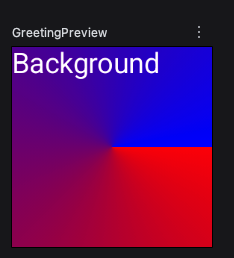
| sweepGradient | listOf(Color.Red, Color.Blue) | 像掃把一樣 | 右邊中間一條線是掃把的握把,左邊是掃把底部 |
horizontalGradient
最左邊是紅色漸變成最右邊是藍色
1
2
3
4
5
6
7
8
9
10
11
12
13
14
@Composable
fun testBrush() {
  Box(
    modifier = Modifier
      .size(100.dp)
      .background(
        brush = Brush.horizontalGradient(
          colors = listOf(Color.Red, Color.Blue)
        )
      )
  ) {
    Text("Background", color = Color.White)
  }
}
linearGradient
左上邊是紅色漸變成右下邊是藍色
1
2
3
4
5
6
7
8
9
10
11
12
13
14
@Composable
fun testBrush() {
  Box(
    modifier = Modifier
      .size(100.dp)
      .background(
        brush = Brush.linearGradient(
          colors = listOf(Color.Red, Color.Blue)
        )
      )
  ) {
    Text("Background", color = Color.White)
  }
}
verticalGradient
由上到下漸變。
radialGradient
中心是紅色漸變成最外圍是藍色
1
2
3
4
5
6
7
8
9
10
11
12
13
14
@Composable
fun testBrush() {
  Box(
    modifier = Modifier
      .size(100.dp)
      .background(
        brush = Brush.radialGradient(
          colors = listOf(Color.Red, Color.Blue)
        )
      )
  ) {
    Text("Background", color = Color.White)
  }
}
sweepGradient
sweep中文翻譯是「掃」,我只能想像,右邊中間一條線是掃把的握把,左邊是掃把底部。
1
2
3
4
5
6
7
8
9
10
11
12
13
14
@Composable
fun testBrush() {
  Box(
    modifier = Modifier
      .size(100.dp)
      .background(
        brush = Brush.sweepGradient(
          colors = listOf(Color.Red, Color.Blue)
        )
      )
  ) {
    Text("Background", color = Color.White)
  }
}
調整顏色漸變的位置
Prerequisites:
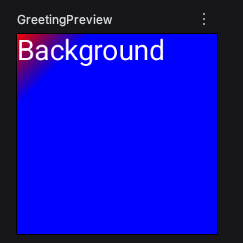
linearGradient start end
可以設定左上角開始漸變的位置,到右下角結束漸變的位置。
start = Offset(0f, 0f)
end = Offset(50f, 50f)
大寫開頭Offset,參數是float,數字後面要加上f。
Offset(0f, 0f)是原點。
螢幕座標系統,y正數是往下,y負數是往上,跟數學的迪卡爾座標是不一樣的。
1
2
3
4
5
6
7
8
9
10
11
12
13
14
15
16
@Composable
fun testBrush() {
  Box(
    modifier = Modifier
      .size(100.dp)
      .background(
        brush = Brush.linearGradient(
          colors = listOf(Color.Red, Color.Blue),
          start = Offset(0f, 0f),
          end = Offset(50f,50f)
        )
      )
  ) {
    Text("Background", color = Color.White)
  }
}
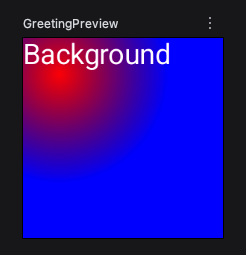
radialGradient center radius
center = Offset(50f, 50f),
radius = 150f
center,設定中心位置,數字都是浮點數,後面要有f。
radius,設定圓的半徑,數字都是浮點數,後面要有f。
1
2
3
4
5
6
7
8
9
10
11
12
13
14
15
16
@Composable
fun testBrush() {
  Box(
    modifier = Modifier
      .size(100.dp)
      .background(
        brush = Brush.radialGradient(
          colors = listOf(Color.Red, Color.Blue),
          center = Offset(50f, 50f),
          radius = 150f
        )
      )
  ) {
    Text("Background", color = Color.White)
  }
}
sweepGradient center
center = Offset(80f, 80f)
center,設定中心位置,數字都是浮點數,後面要有f。
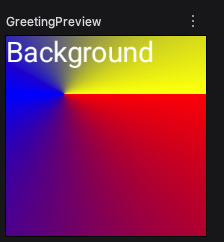
下面例子有三種顏色,分別是紅、藍、黃。
1
2
3
4
5
6
7
8
9
10
11
12
13
14
15
16
17
18
@Composable
fun testBrush() {
  Box(
    modifier = Modifier
      .size(100.dp)
      .background(
        brush = Brush.sweepGradient(
          colors = listOf(
            Color.Red,
            Color.Blue,
            Color.Yellow),
          center = Offset(80f, 80f)
        )
      )
  ) {
    Text("Background", color = Color.White)
  }
}
以下是舊文章
背景顏色漸變
1
2
Brush.verticalGradient(
listOf(Color(0xFF149EE7), Color.White))
完整程式碼
1
2
3
4
5
6
7
8
9
Column(
  modifier = Modifier
    .fillMaxSize() //鋪滿全屏
    .background(
      //背景漸變色從上到下垂直漸變 從藍變白
      Brush.verticalGradient(
listOf(Color(0xFF149EE7), Color.White))
    )
){}
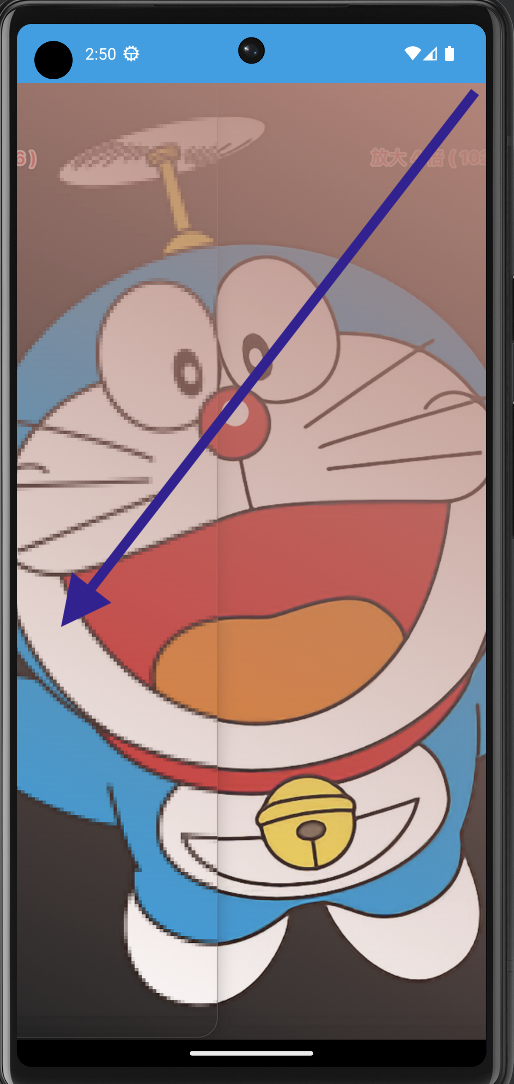
右上往左下漸變
1
2
3
4
5
6
7
  Brush.linearGradient(
    listOf(Color(0xffbb8378), Color.Transparent),
		  //x值為屏幕的寬度 y值為頂端0
    start = Offset(x = screenWidth, y = 0f),
		  //x值為0 y值為屏幕的高度
    end = Offset(x = 0f, y = screenHeight)
  )
完整程式碼
1
2
3
4
5
6
7
8
9
10
11
12
13
14
15
16
17
18
19
20
  var screenWidth: Float //螢幕寬度
  var screenHeight: Float //螢幕高度
  with(LocalDensity.current) {
  screenWidth = LocalConfiguration.current.screenWidthDp.dp.toPx()
  screenHeight = LocalConfiguration.current.screenHeightDp.dp.toPx()
  }
  //右上往左下漸變
  Box(
  modifier = Modifier
  .fillMaxSize()
  .background(
  Brush.linearGradient(
    listOf(Color(0xffbb8378), Color.Transparent),
		  //x值為屏幕的寬度 y值為頂端0
    start = Offset(x = screenWidth, y = 0f),
		  //x值為0 y值為屏幕的高度
    end = Offset(x = 0f, y = screenHeight)
  )
  )
  )
左下往右上漸變
1
2
start = Offset(x = 0f, y = screenHeight),
end = Offset(x = screenWidth, y = 0f)
完整程式碼
1
2
3
4
5
6
7
8
9
10
11
12
//左下往右上漸變
Box(
  modifier = Modifier
  .fillMaxSize()
  .background(
    Brush.linearGradient(
    listOf(Color(0xFF149EE7), Color.Transparent),
    start = Offset(x = 0f, y = screenHeight),
    end = Offset(x = screenWidth, y = 0f)
    )
  )
)