Text TextSpan
Text 屬性
| 屬性 | 類別 | 說明 |
|---|---|---|
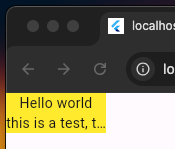
| data | String | 必填 |
| style | TextStyle | 樣式:字體、大小、粗體、顏色 |
| textAlign | TextAlign | 對齊方式 |
| maxLines | int | 最大行數。 |
| overflow | TextOverflow | 太多字會以…收尾。 |
| softWrap | bool | true 自動換行 |
1
2
3
4
5
6
7
8
9
10
11
12
13
14
15
16
17
18
19
20
21
22
23
24
25
26
import 'package:flutter/material.dart';

void main() {
  runApp(MainPage());
}

class MainPage extends StatelessWidget {
  const MainPage({Key? key}) : super(key: key);
  @override
  Widget build(BuildContext context) {
    return MaterialApp(
        home: Scaffold(
      body: Container(
        width: 100,
        color: Colors.yellow,
        child: Text(
          'Hello world this is a test, this is a test, this is a test',
          maxLines: 2,
          overflow: TextOverflow.ellipsis,
          textAlign: TextAlign.center,
          softWrap: true,
        ),
      ),
    ));
  }
}
TextStyle 屬性
| 屬性 | 類別 | 範例 | 說明 |
|---|---|---|---|
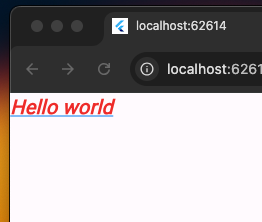
| font | float | 20.0 | 字體大小 |
| color | Color | Color.blue | 字體顏色 |
| fontWeight | FontWeight | FontWeight.bold | 粗體 |
| fontStyle | FontStyle | FontStyle.italic | 斜體 |
| decoration | TextDecoration | TextDecoration.underline | 底線 |
| decorationColor | Colors | Colors.blue | 底線顏色 |
1
2
3
4
5
6
7
8
9
10
11
12
13
14
15
16
17
18
19
20
21
22
class MainPage extends StatelessWidget {
  const MainPage({Key? key}) : super(key: key);
  @override
  Widget build(BuildContext context) {
    return MaterialApp(
        home: Scaffold(
      body: Container(
        child: Text(
          'Hello world',
          style: TextStyle(
            fontSize: 20,
            fontWeight: FontWeight.bold,
            fontStyle: FontStyle.italic,
            decoration: TextDecoration.underline,
            decorationColor: Colors.blue,
            color: Colors.red,
          ),
        ),
      ),
    ));
  }
}
TextSpan
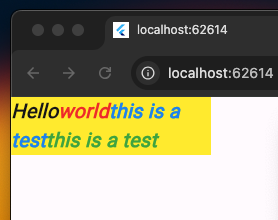
如果需要在同一段文字中,顯示各種不同樣式的文字組合一起,可以使用TextSpan。
使用Text.rich()建構子,參數為TextSpan類別。
Text.rich(TextSpan())
| 屬性 | 類別 | 說明 |
|---|---|---|
| text | String | 文字 |
| children | List<TextSpan> |
很多TextSpan連在一起 |
| style | TextStyle | 所有children共享字體樣式 |
1
2
3
4
5
6
7
8
9
10
11
12
13
14
15
16
17
18
19
20
21
22
23
24
25
26
27
28
29
30
31
32
33
import 'package:flutter/material.dart';

void main() {
  runApp(MainPage());
}

class MainPage extends StatelessWidget {
  const MainPage({Key? key}) : super(key: key);
  @override
  Widget build(BuildContext context) {
    return MaterialApp(
        home: Scaffold(
      body: Container(
          width: 200,
          color: Colors.yellow,
          child: Text.rich(TextSpan(
              text: "Hello",
              children: [
                TextSpan(text: "world", style: TextStyle(color: Colors.red)),
                TextSpan(
                    text: "this is a test",
                    style: TextStyle(color: Colors.blue)),
                TextSpan(
                    text: "this is a test",
                    style: TextStyle(color: Colors.green)),
              ],
              style: TextStyle(
                  fontSize: 20,
                  fontWeight: FontWeight.bold,
                  fontStyle: FontStyle.italic)))),
    ));
  }
}