Image
asset 環境設定
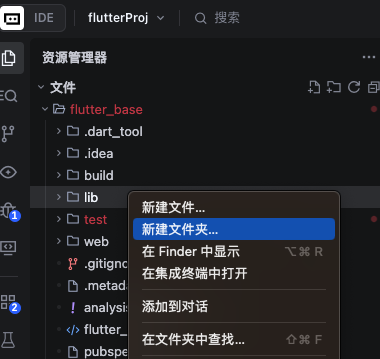
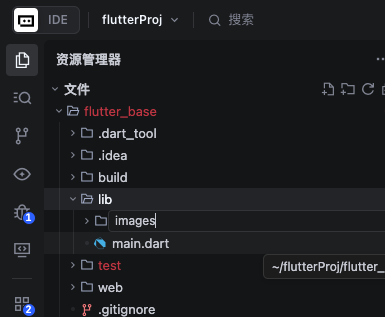
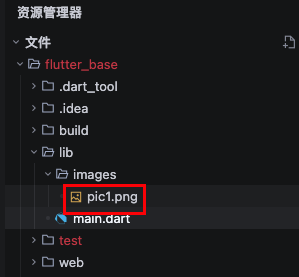
在 lib 目錄下建立images目錄
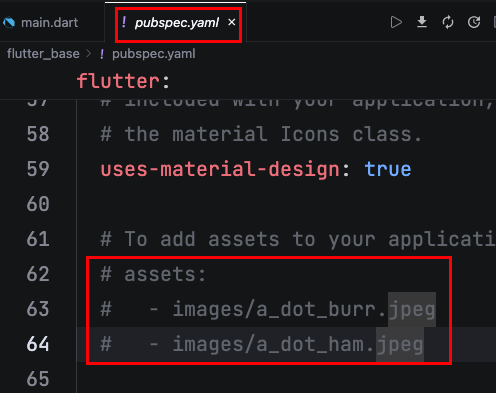
修改 pubspec.yaml
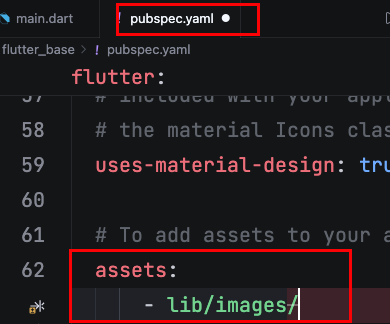
放置圖片在lib/images/目錄下
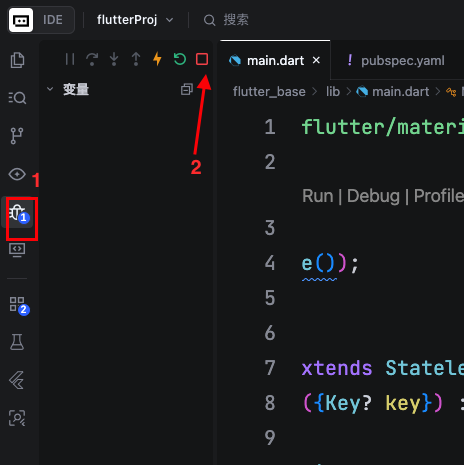
停止run
因變更pubspec.yaml與目錄,需要重新打包。
屬性
| 屬性 | 說明 |
|---|---|
| fit | 寬高比對父類別 |
| width | 寬度 |
| height | 高度 |
fit說明:
- BoxFit.fitHeight 跟父類別的高度一樣
- BoxFit.fitWidth 跟父類別的寬度一樣
- BoxFit.fill 寬高跟父類別一樣
沒有fit屬性,大小跟原本圖片一樣。
程式碼
執行以下程式碼。

1
2
3
4
5
6
7
8
9
10
11
12
13
14
15
16
17
18
19
20
21
import 'package:flutter/material.dart';

void main() {
  runApp(MainPage());
}

class MainPage extends StatelessWidget {
  const MainPage({Key? key}) : super(key: key);
  @override
  Widget build(BuildContext context) {
    return MaterialApp(
        home: Scaffold(
      body: Container(
          height: 500,
          width: 500,
          color: Colors.yellow,
          child: Image.asset("lib/images/pic1.jpeg",
              width: 100, height: 100, fit: BoxFit.contain)),
    ));
  }
}
network
1
2
3
4
5
6
7
8
9
10
11
12
13
14
15
16
17
18
class MainPage extends StatelessWidget {
  const MainPage({Key? key}) : super(key: key);
  @override
  Widget build(BuildContext context) {
    return MaterialApp(
        home: Scaffold(
      body: Container(
          height: 500,
          width: 500,
          color: Colors.yellow,
          child: Image.network(
              "網址,
              width: 100,
              height: 100,
              fit: BoxFit.contain)),
    ));
  }
}