Center, Align
Center
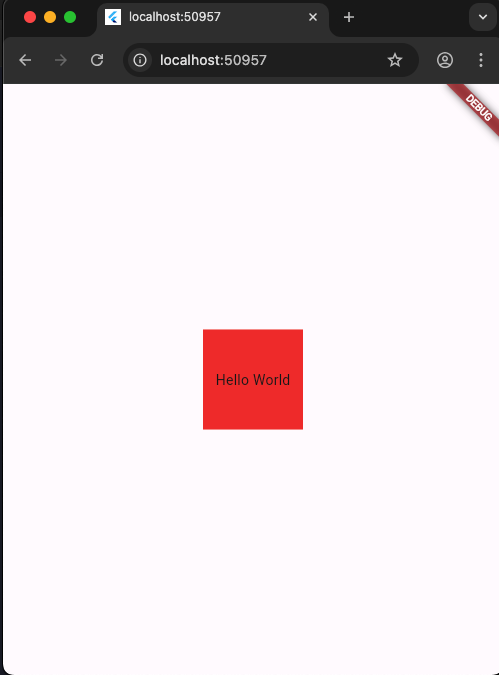
Center 沒有寬(width)高(height)屬性,若要有寬高屬性,child要包Container。
1
2
3
4
5
6
7
8
9
10
11
12
13
14
15
16
17
18
19
20
21
22
import 'package:flutter/material.dart';

void main() {
  runApp(MainPage());
}

class MainPage extends StatelessWidget {
  const MainPage({Key? key}) : super(key: key);
  @override
  Widget build(BuildContext context) {
    return MaterialApp(
        home: Scaffold(
      body: Center(
        child: Container(
            width: 100,
            height: 100,
            color: Colors.red,
            child: Center(child: Text("Hello World"))),
      ),
    ));
  }
}
Align
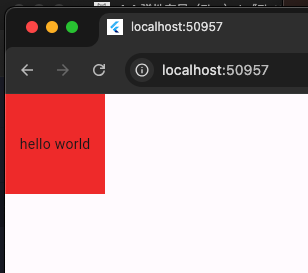
Align 屬性
1
2
3
4
5
6
7
8
9
10
11
12
13
14
class MainPage extends StatelessWidget {
  const MainPage({Key? key}) : super(key: key);
  @override
  Widget build(BuildContext context) {
    return MaterialApp(
        home: Scaffold(
            body: Container(
                alignment: Alignment.center,
                width: 100,
                height: 100,
                color: Colors.red,
                child: Text('hello world'))));
  }
}
Align 佈局元件
| 屬性 | 說明 |
|---|---|
| alignment | 子組件在父組件的對齊方式 |
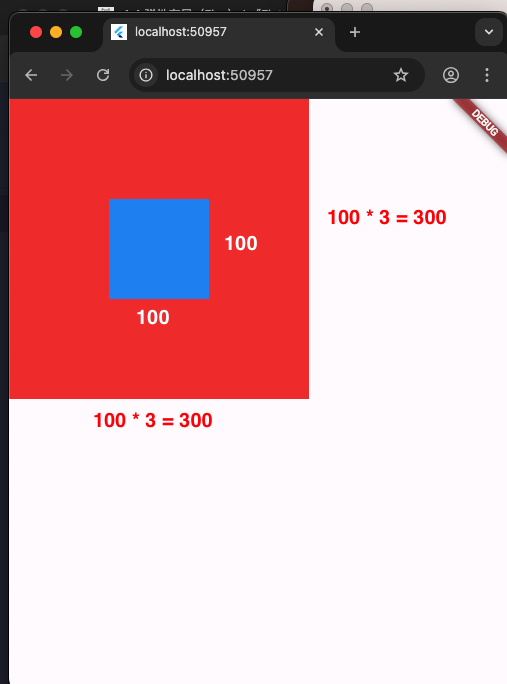
| widthFactor | 父組件的寬度 = Align 中的子組件 * widthFactor |
| heightFactor | 父組件的高度 = Align 中的子組件 * heightFactor |
1
2
3
4
5
6
7
8
9
10
11
12
13
14
15
16
17
18
19
20
21
22
23
24
25
26
27
import 'package:flutter/material.dart';

void main() {
  runApp(MainPage());
}

class MainPage extends StatelessWidget {
  const MainPage({Key? key}) : super(key: key);
  @override
  Widget build(BuildContext context) {
    return MaterialApp(
        home: Scaffold(
            body: Container( // 父組件
                color: Colors.red,
                // 子組件
                child: Align(
                    alignment: Alignment.center,
                    widthFactor: 3,
                    heightFactor: 3,
                    // Align 中的子組件
                    child: Container(
                      color: Colors.blue,
                      width: 100,
                      height: 100,
                    )))));
  }
}